Claude Code Dynamic Workflow: A Deep Dive
Claude Code Dynamic Workflow uses AI-generated orchestration scripts to decompose, parallelize, verify, and merge tasks, overcoming the context, parallelism, and verification limits of single-agent loops.
Dynamic Workflow is fundamentally AI-driven divide-and-conquer — Claude dynamically generates orchestration scripts that “decompose → parallel-solve → verify → merge”, executed by an independent runtime, breaking through the context, parallelism, and verification bottlenecks of the single Agent loop.
On May 28, 2026, Anthropic announced the Dynamic Workflow capability:
Claude dynamically writes orchestration scripts, fans work out across tens to hundreds of parallel subagents, and verifies its own results before presenting them.
Why does this matter? Anthropic’s headline case study — rewriting the Bun project from Zig to Rust:
- Codebase size: ~750k lines
- Duration: 11 days
- Test pass rate: 99.8%
This marks a significant step forward in Claude Code’s autonomous planning and engineering capabilities for large-scale, complex projects.
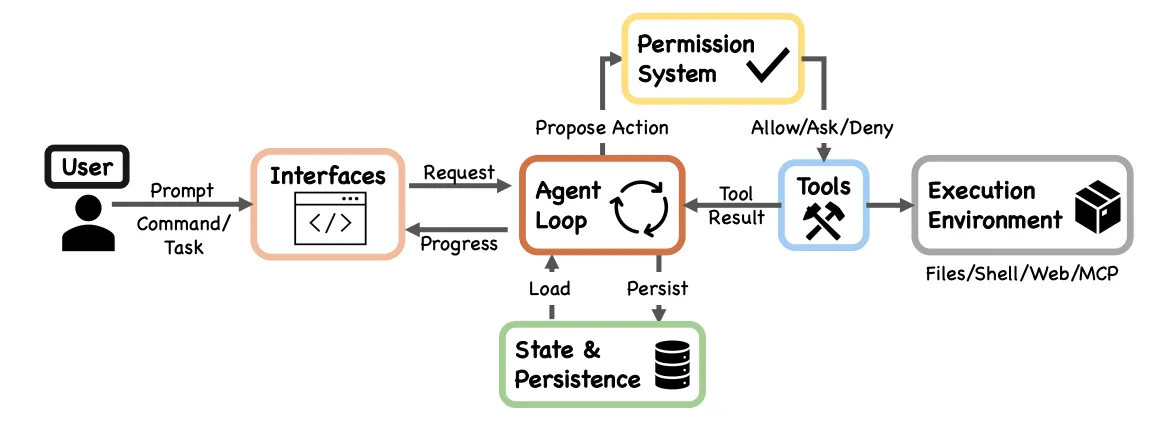
According to the paper “Dive into Claude Code: The Design Space of AI Agent Systems”, the core of Claude Code is a reactive while-loop:
The core of the system is a simple while-loop that calls the model, runs tools, and repeats.
Execution flow: Context assembly → Model call → Tool routing → Permission check → Execution → Compaction → Loop.
Key characteristics:
- Uniformity: Whether CLI, IDE, or Agent SDK, all run the same
queryLoop()function - Existing sub-agent capability: Subagents are called via the Agent Tool, essentially “an isolated-context queryLoop() instance that returns only a summary to the parent Agent”
- Separation of concerns: The core loop stays lean; complexity like Permission and Execution Environment is encapsulated in peripheral modules
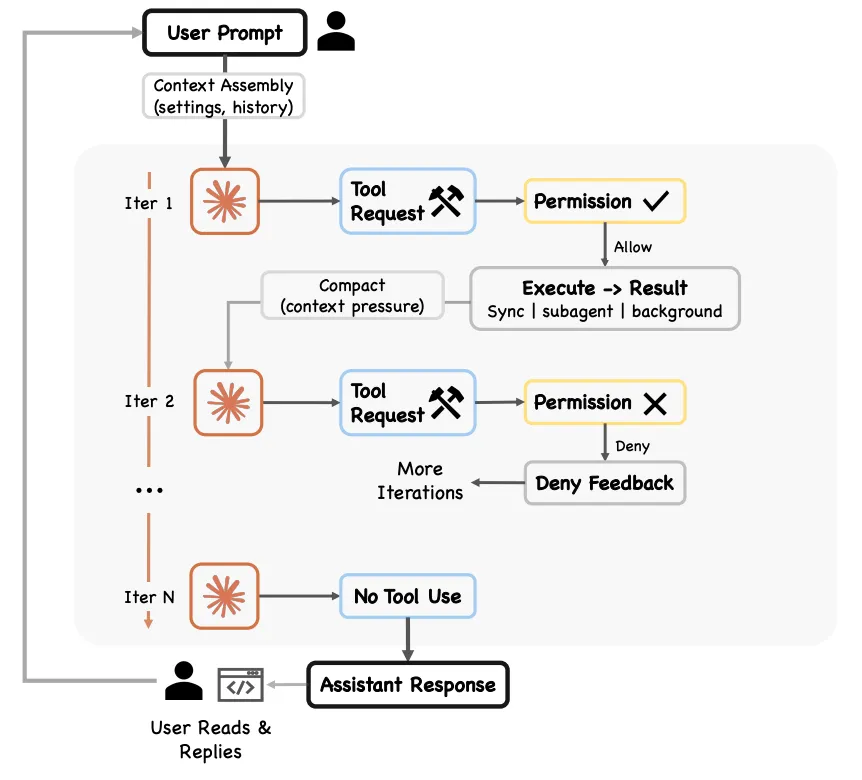
Although Claude Code already had subagent capabilities, in the original model orchestration decisions were still made by the Main Agent, turn by turn. The longer Claude works on a complex task within a single context window, the more likely these failure modes become:
- Agentic laziness: Stopping before completing a particularly complex multi-part task, declaring work done after partial progress. For example, handling only 20 out of 50 items in a security audit.
- Self-preferential bias: A tendency to favor one’s own results or findings, especially when asked to verify or judge them.
- Goal drift: Gradual loss of fidelity to the original objective over multiple conversation turns (especially after compaction). Each summarization step is lossy — edge-case requirements or “don’t do X” constraints can be lost.
Dynamic Workflow structurally solves all three problems by externalizing orchestration decisions into independent scripts — each sub-agent has its own context (solving laziness and goal drift), and independent verification agents review each other (solving self-preferential bias).
Core idea: Don’t change the Agent Loop itself — instead, externalize “orchestration decisions” from Claude’s reasoning into an independent script runtime.
Key definitions from the official docs:
A dynamic workflow is a JavaScript script that orchestrates subagents at scale. Claude writes the script for the task you describe, and a runtime executes it in the background while your session stays responsive.
With subagents and skills, Claude is the orchestrator. A workflow script holds the loop, the branching, and the intermediate results itself, so Claude’s context holds only the final answer.
┌──────────────────────────────────────────────────────────┐│ Claude Code Session ││ ││ ┌─────────────────────────────────────────────────┐ ││ │ Main Agent (queryLoop) │ ││ │ │ ││ │ User input → Reason → Tool call → Observe → Loop│ ││ │ │ │ ││ │ ┌──────────┴──────────┐ │ ││ │ ▼ ▼ │ ││ │ [Regular tool calls] [Workflow Tool] │ ││ │ Read/Edit/Bash/ Generate JS orchestration │ ││ │ Agent Tool... script → Runtime │ ││ └───────┬──────────────────────┬───────────────────┘ ││ │ │ ││ ▼ ▼ ││ ┌──────────────┐ ┌─────────────────────────────┐ ││ │ Subagent │ │ Workflow Runtime │ ││ │ (queryLoop) │ │ (Isolated environment) │ ││ │ │ │ │ ││ │ - Isolated │ │ JS script holds: │ ││ │ context │ │ - Loop/branch logic │ ││ │ - Returns │ │ - Intermediate results │ ││ │ summary │ │ (script variables) │ ││ │ - Claude │ │ - phase() grouping │ ││ │ decides │ │ │ ││ │ next step │ │ Dispatches subagents: │ ││ │ │ │ ┌──┐┌──┐┌──┐...×N │ ││ └──────────────┘ │ │A ││B ││C │ │ ││ │ └┬─┘└┬─┘└┬─┘ │ ││ │ ▼ ▼ ▼ │ ││ │ Each runs queryLoop() │ ││ │ (isolated, returns results)│ ││ │ │ │ ││ │ ▼ │ ││ │ Script: verify/aggregate/ │ ││ │ iterate │ ││ └──────────┬─────────────────┘ ││ │ ││ ▼ ││ Final result → Main Agent │└──────────────────────────────────────────────────────────┘Key points:
- Agent Loop (queryLoop) has not been replaced — every subagent is still fundamentally a queryLoop instance
- What’s new is the Workflow Runtime: an independent script execution environment
- Orchestration decisions move from “Claude’s reasoning” into “script code”
- Intermediate results live in script variables, never entering any Agent’s context window
- The main session remains responsive while the workflow runs
Concurrency model: single-process, async concurrency
Claude Code is a Node.js/TypeScript application, naturally suited to async concurrency (async/await). The concurrency cap formula is min(16, cpu cores - 2) — constrained by API rate limits, memory usage, and CPU-intensive context assembly, with local compute resources being one of the main bottlenecks. The “isolated environment” mentioned in the docs refers to logical isolation (independent context / variable scope), and the most likely model is single-process, async concurrent scheduling, like an async task pool with capacity 16.
Algorithmic thinking: divide-and-conquer + DAG
Dynamic Workflow’s orchestration model is fundamentally DAG (Directed Acyclic Graph) execution — supporting dependency relationships and result propagation, with divide-and-conquer at its core.
| Algorithmic concept | Applicability | Notes |
|---|---|---|
| Divide & conquer | ✅ Fully applicable | Break large tasks into independent sub-tasks, solve in parallel, merge results |
| Memoization / caching | 🟡 Partially | Script variables are natural “memos”; on resume, completed agents return cached results without re-running |
| Topological sort | 🟡 Can be implemented via script | Solve common dependencies first, then process independent tasks in parallel |
| Dynamic programming | ❌ State transitions don’t apply | But the “cache solved sub-problems” concept is naturally present via script variables |
For scenarios with shared dependencies, the correct approach is to explicitly extract common steps in the script:
// Solve the common sub-problem firstconst sdkAnalysis = await agent("Analyze the SDK's public interface definitions and constraints");
// Then solve independent sub-problems in parallel, passing the common resultconst results = await pipeline(plugins, (plugin) =>  agent(`Review ${plugin} based on the following constraints: ${sdkAnalysis}`),);
This is dependency handling (topological sort) within a DAG.
Applicability: Dynamic Workflow is best suited for scenarios where sub-tasks are independent (pure divide-and-conquer). When shared dependencies exist, the AI must recognize and explicitly orchestrate them when generating the script. When strong sequential dependencies or shared mutable state exist, the divide-and-conquer strategy itself is not applicable.
The Claude Code documentation categorizes orchestration capabilities into four levels, distinguished by “who holds the plan”:
| Dimension | Original Subagent | Skills | Agent Teams | Dynamic Workflow |
|---|---|---|---|---|
| Essence | Workers dispatched by Claude | Behavior patterns Claude follows | Manually predefined role organization | JS script executed at runtime |
| Orchestrator | Main Agent (Claude’s reasoning) | Claude (guided by Skill) | Manual code | JS script (AI-generated) |
| Decision method | Claude decides next step each turn | Claude decides per Skill template | Predefined fixed flow | Script holds loops and branches |
| Intermediate results | Land in Claude’s context | Land in Claude’s context | Each agent’s context | Script variables (not in context) |
| Scale | A few per turn | A few per turn | Fixed role count | Tens to hundreds per run |
| Structure lifetime | Re-decided each turn | Session-scoped | Fixed before deploy | Generated per task, destroyed after |
| Applicable scale | Small task delegation | 10-20 step structured tasks | Medium-complexity fixed flows | Large-scale parallel (500+ files) |
| Analogy | One person calling for temporary help | One person following SOPs | Fixed org chart | Project-based temporary team |
Work modes are essentially the topological structure of the DAG corresponding to Dynamic Workflow execution.
Below are several modes Claude commonly uses when building workflows.
Core idea: First determine “what it is”, then decide “what to do”.
Use a classifier Agent to determine the task type, then route to different processing logic, Agents, or models. A classifier can also be used at the end of a flow to determine output format.
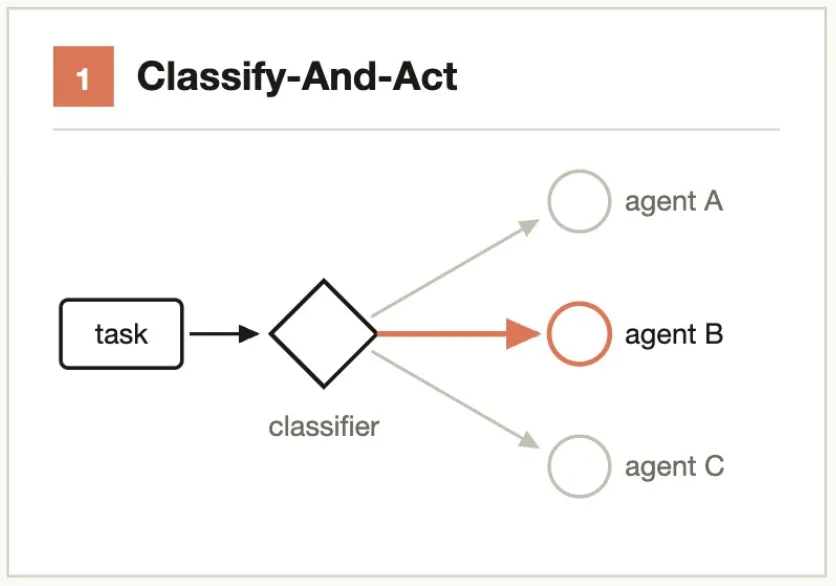
Typical scenarios:- Support ticket → Classifier Agent judges severity → Routes to "auto-fix" or "escalate to human"- Code change → Classifier Agent evaluates complexity → Routes to Sonnet (simple) or Opus (complex)Core idea: Decompose → parallel-solve → barrier-wait → merge results.
Break the task into multiple independent sub-steps, assigning each to a separate Agent. The synthesize step is a barrier — wait for all fanned-out Agents to complete, then merge structured outputs into a final result.
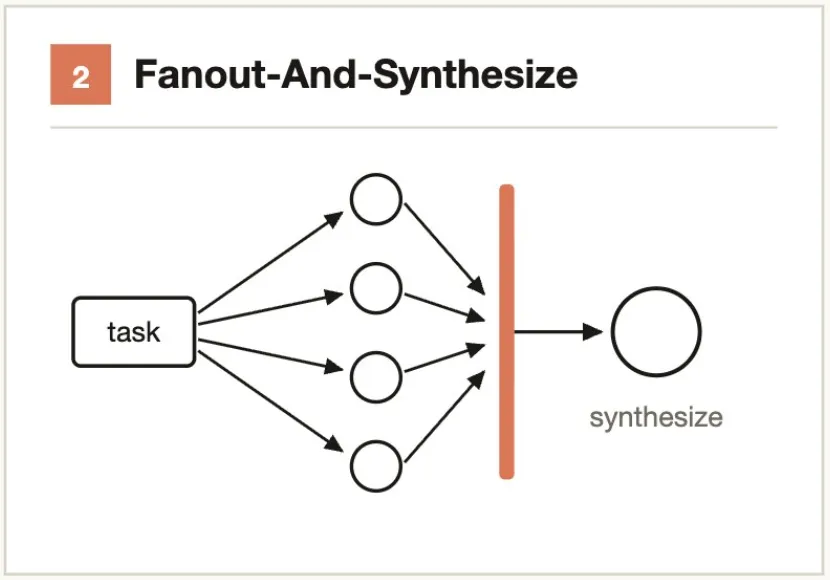
When to use: When there are many sub-steps, or each step needs a clean context window to avoid cross-contamination.
Typical scenarios:- Audit 50 API endpoints → 1 Agent per endpoint → Aggregate into an audit report- Analyze performance of 20 modules → Parallel profiling → Synthesize and rank optimization prioritiesCore idea: Have a “skeptic” try to refute every finding.
Run an independent verification Agent for the result of each producing Agent, where the verification Agent is instructed to attempt to refute (not confirm). Majority vote determines whether the finding stands.
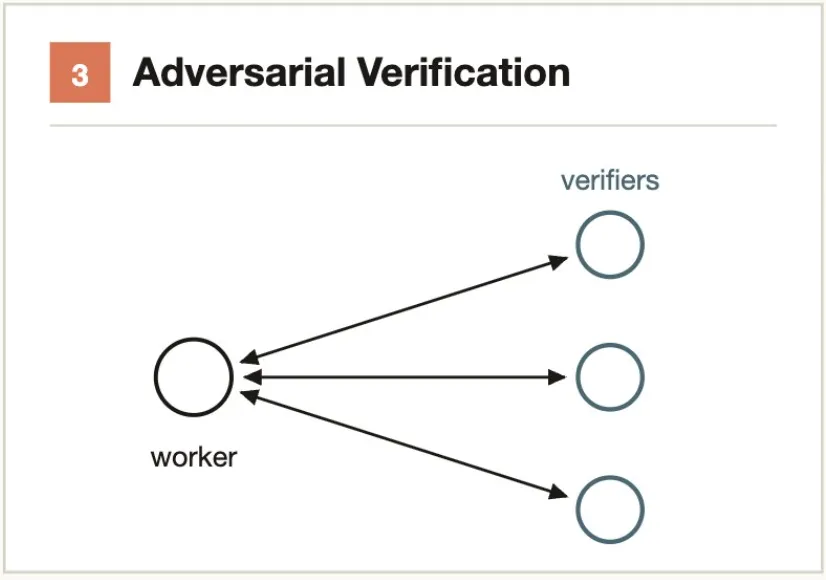
Problem it solves: Self-preferential bias of a single Agent — an Agent verifying its own results almost never finds issues.
Typical scenarios:- Agent A finds a security vulnerability → Agent B is prompted "try to prove this is NOT a vulnerability" → 2 out of 3 votes confirm it's real- Code review finds 5 bugs → Each bug has an independent Agent attempt to construct a counterexampleCore idea: Generate generously, filter strictly.
Generate a large number of candidate solutions, then filter through verification, deduplication, and scoring, keeping only high-quality, tested results.
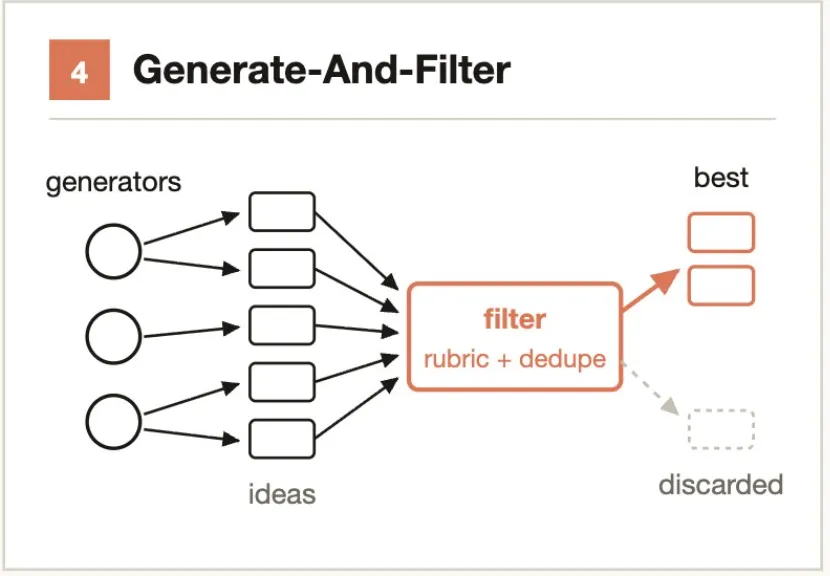
Typical scenarios:- Come up with 50 names for a CLI tool → Deduplicate → Filter by availability/meaning/pronunciation → Keep top 5- Generate 20 architectural proposals → Score by performance/maintainability/cost → Select top 3 for reviewCore idea: Compete rather than divide-and-conquer. Pairwise comparison is more reliable than absolute scoring.
Generate N Agents, each attempting the same task with a different approach. A judging Agent then evaluates them in pairwise comparisons round by round until a winner emerges.
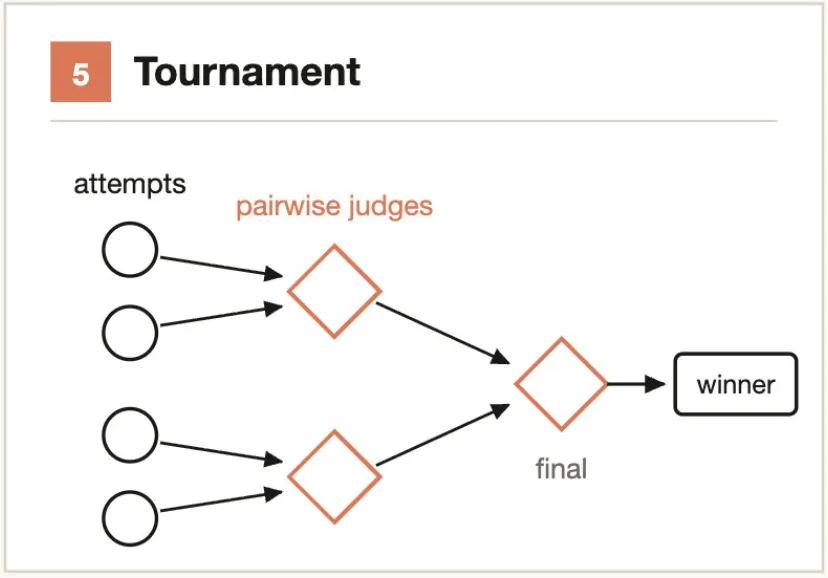
Why it beats scoring: Humans (and AI) are far more accurate at relative judgments like “A is better than B” than absolute ratings like “A gets 8.2”.
Typical scenarios:- 3 Agents implement caching solutions with different architectures → Judging Agent compares pairwise → Selects the best- 1000+ support tickets ranked by severity → Tournament-style pairwise comparison → Output ordered listCore idea: Don’t set a fixed number of iterations — set a stopping condition.
For tasks with unknown workloads, loop-dispatch Agents until a stopping condition is met (K consecutive rounds with no new findings, no new errors in logs, all tests pass), rather than using a fixed iteration count.
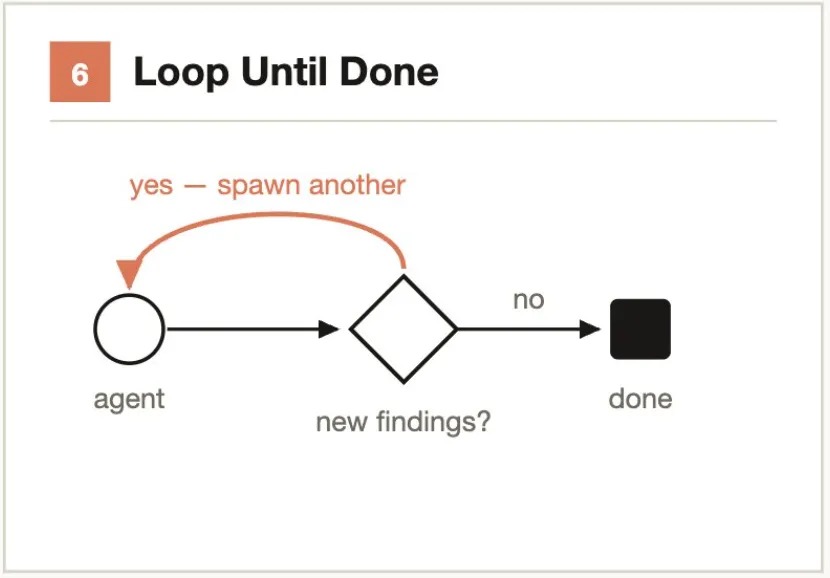
Problem it solves: Fixed counts may stop too early (missing long-tail issues) or too late (wasting tokens).
Typical scenarios:- Continuously mine codebase for security vulnerabilities → 2 consecutive rounds with no new findings → Stop- Iteratively fix lint errors → Until lint command outputs 0 errors → StopReal-world workflows typically combine multiple modes. For example, large-scale Code Review = Fan-out-and-synthesize (by module) + Adversarial verification (each finding reviewed by skeptics) + Loop-until-done (keep discovering until no new issues) + Classify-and-act (categorize output by severity).
Primary modes: Fan-out-and-synthesize + Adversarial verification
Break the task into units needing individual operations (call sites, failing tests, modules), launch an independent Agent in a worktree for each fix, then have another Agent perform adversarial review before merging.
Tell Agents not to use resource-intensive commands (like full builds) so you can maximize parallelism without exhausting machine resources.
Headline case: Bun project rewritten from Zig to Rust — 750k lines, 11 days, 99.8% test pass rate.
Primary modes: Fan-out-and-synthesize + Adversarial verification
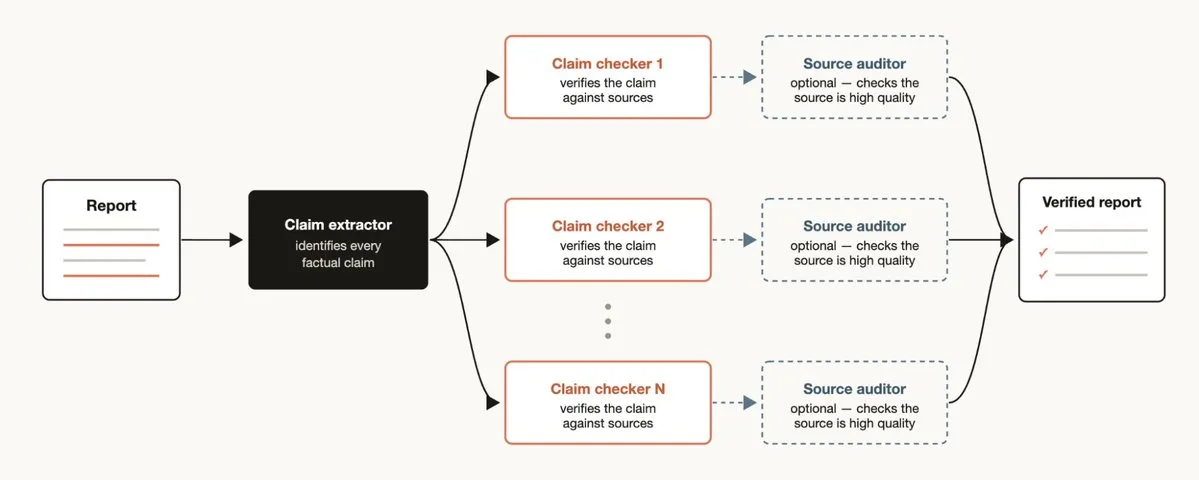
When you have a report and need to check every factual claim it references:
Workflow structure:1. Claim identification Agent → Extract all factual claims from the report2. For each claim, launch a source-finding Agent → Find supporting evidence3. Verification Agent → Check whether the evidence found is high-quality4. Synthesize → Label each claim's verification status (verified / unverified / questionable)Primary mode: Tournament
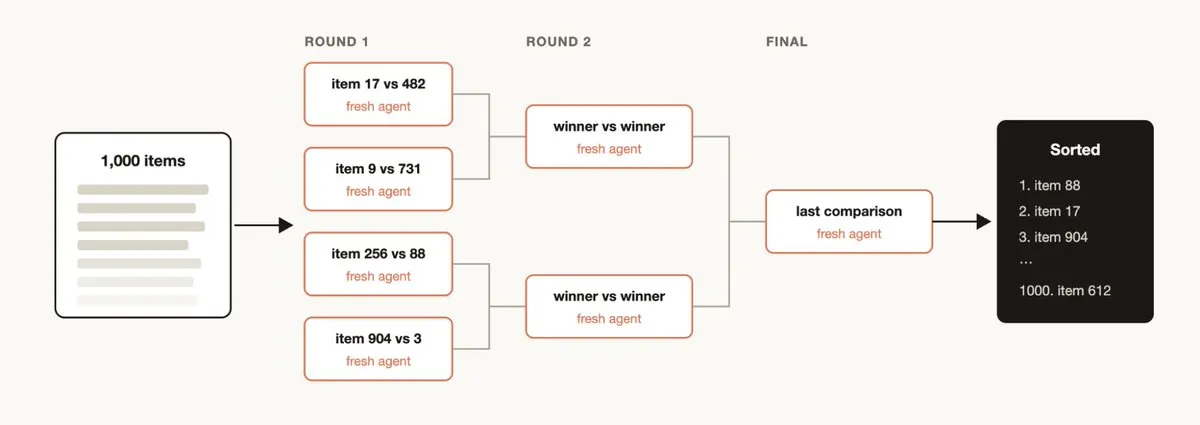
Sort a large number of items by qualitative criteria (e.g., ranking 1000+ support tickets by bug severity). A single prompt can’t handle this scale and quality degrades.
Recommended approaches:
- Tournament: Pairwise comparison (comparative judgment is more reliable than absolute scoring), each comparison is an independent Agent
- Bucket + merge: Parallel bucket ranking first, then merge buckets
- A deterministic loop holds the tournament bracket; only the running state stays in context
Primary modes: Fan-out-and-synthesize + Adversarial verification + Generate-and-filter
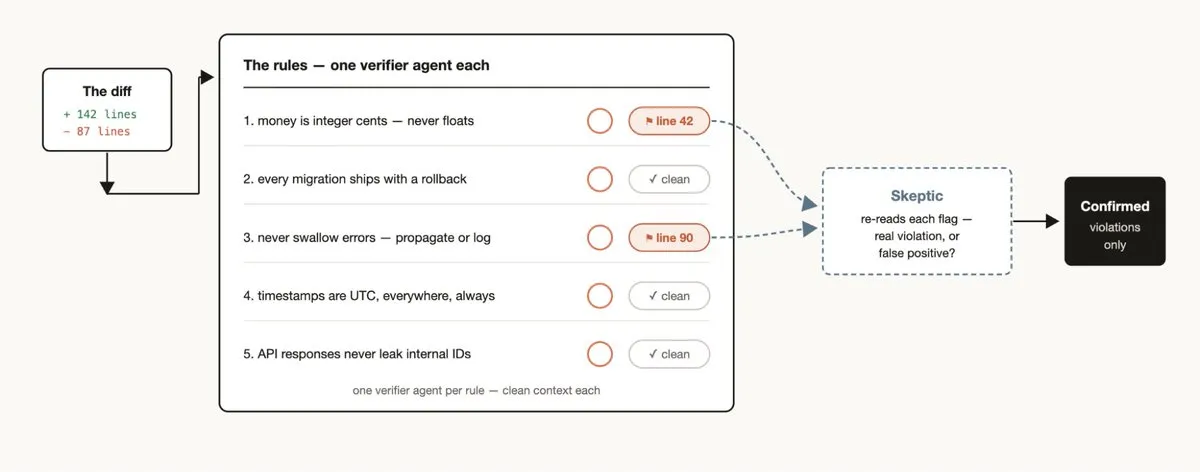
When you find Claude repeatedly violating certain rules (even when written in CLAUDE.md):
Positive enforcement: Create a workflow assigning a verifier Agent for each rule. Combine with “skeptic” Agent review to avoid excessive false positives.
Reverse mining:
1. Mine the last 50 sessions and Code Reviews for recurring corrections2. Parallel Agents cluster the corrections3. Adversarially verify each candidate rule ("Does this rule actually prevent the error?")4. Distill survivors into CLAUDE.mdPrimary modes: Classify-and-act + Loop-until-done
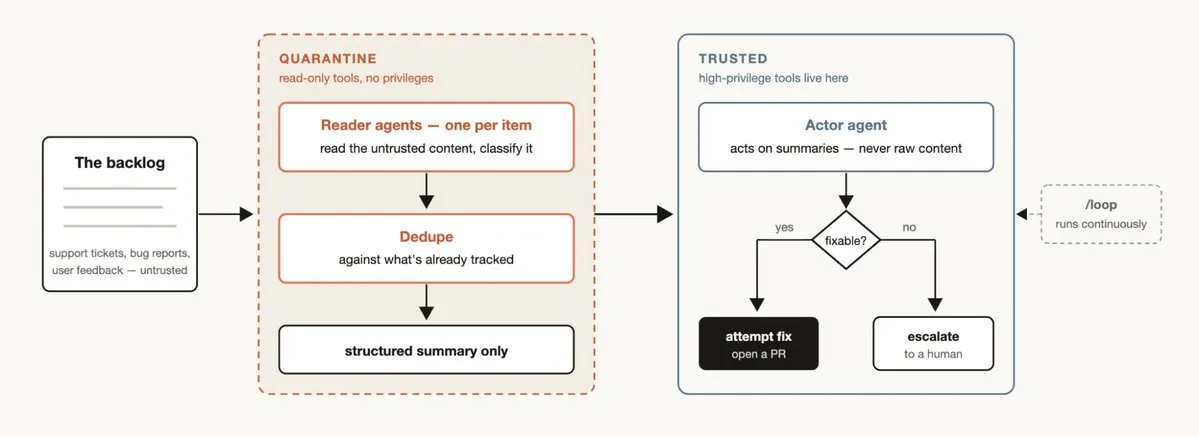
Every team has backlogged support queues, bug reports, or other to-dos that can’t be fully handled by humans.
Triage workflow in three steps: Classify → Deduplicate against tracked items → Take action (auto-fix or escalate to human).
Quarantine mode: Agents that read untrusted public content must not execute high-privilege operations (like writing to databases or sending notifications). High-privilege operations are handled by dedicated action Agents. This is the security principle of separation of concerns.
Continuous operation: Pair with /loop to enable Claude to continuously auto-triage, creating a “24/7 on-call Agent”.
- Fixing a single simple bug — the overhead of launching a workflow far outweighs the benefit
- Strong sequential dependencies or shared state — divide-and-conquer no longer applies
- Token-budget-conscious daily development — official docs explicitly note “a single run can use meaningfully more tokens than working through the same task in conversation”
Guiding principle: If the task can be completed with high quality by a single Claude in one context window, don't force a workflow. The value of workflows is in enabling Claude to do things it couldn't do before, not adding unnecessary complexity to simple tasks.
Business context: Large codebases with many modules; daily MRs span multiple business lines; manual review is time-consuming and limited in dimension coverage.
Application: Assign an independent Agent to each module for parallel review — device control/security, network communication/protocol compliance, UI components/consistency, data storage/privacy compliance, automation scenarios/logic integrity. Verifier Agents adversarially verify findings and filter false positives.
Expected benefits: Large MR review time reduced from hours to minutes, with more comprehensive dimension coverage. Can be saved as a team-standard workflow (.claude/workflows/) and reused via /<name>.
Current AI Reviewer is essentially a single-Prompt review. Upgraded to Dynamic Workflow, you can dispatch specialized Agents by dimension (code style, architectural soundness, security, performance, concurrency safety, UI standards), with an Aggregator synthesizing a structured review report.
Business context: Apps continuously undergo technical modernization; typical migration tasks include Objective-C → Swift, old API → new framework, old analytics → new data collection SDK.
Application: Assign an independent Agent to each file/module for parallel migration; Verifier Agents validate functional equivalence post-migration. The Bun case (750k lines / 11 days / 99.8%) validates the feasibility of this model.
Business context: IoT device control involves large amounts of sensitive data (device tokens, user privacy, home information), with strict compliance requirements.
Audit dimensions (one Agent group per dimension):
- Permission check completeness
- Token/key hardcoding or leakage risk
- Network communication encryption compliance
- User data storage compliance (GDPR/PIPL)
- Third-party SDK permission review
Key value: Adversarial verification dramatically reduces false-positive rates; multi-dimensional parallelism ensures no gaps.
Application: Parallel analysis of uncovered code paths → Each Agent generates unit tests for one module → Verifier Agent validates test quality and effectiveness.
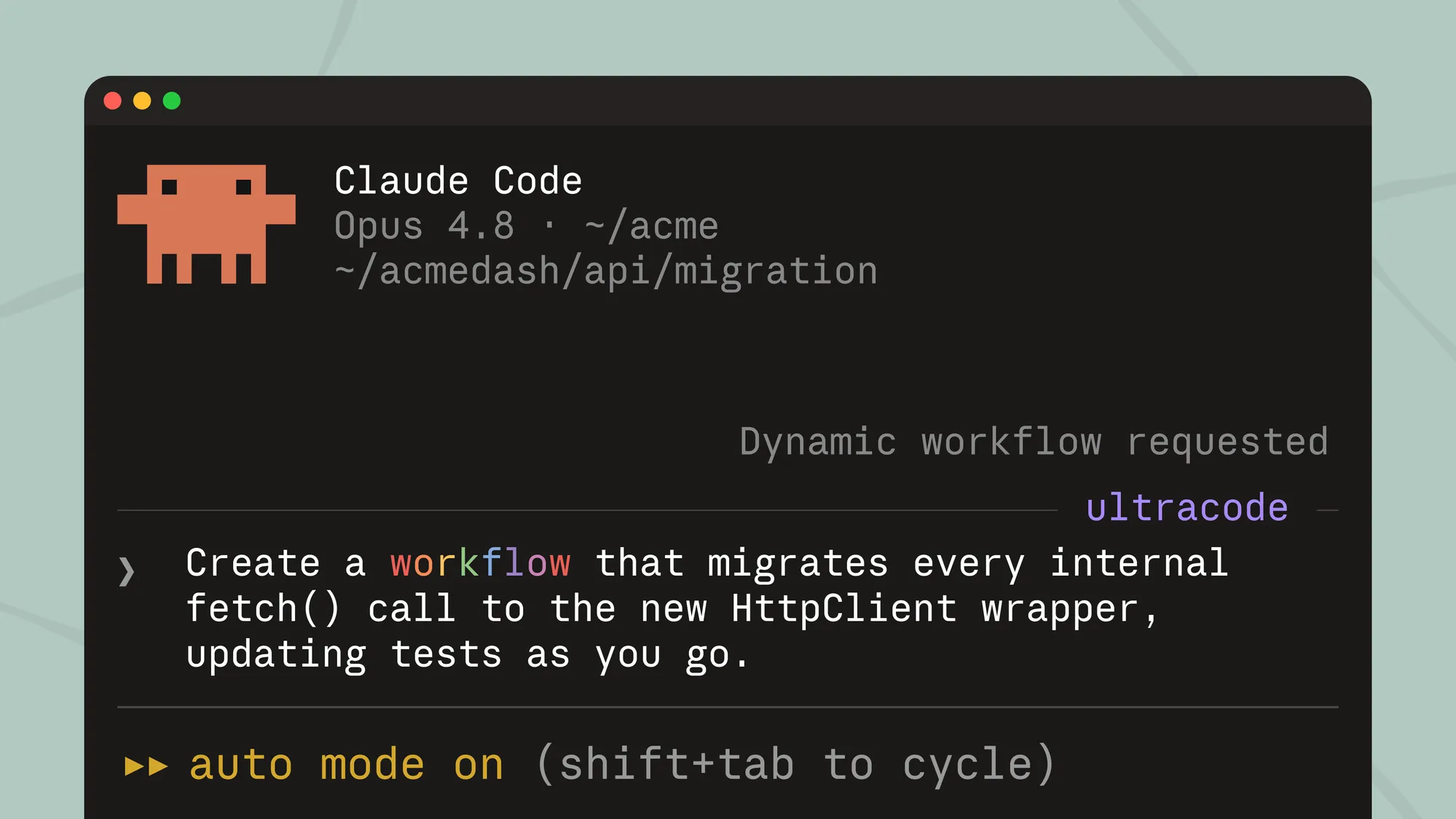
Keyword trigger: Include workflow or ultracode keywords in the prompt. ultracode was added in v2.1.160+ and also enables xhigh reasoning effort. Natural language like “use a workflow” also works. Claude will write a workflow script instead of step-by-step execution. Press Alt+W to cancel a false trigger.
Ultracode mode: Type /effort ultracode, combining xhigh reasoning effort + automatic workflow orchestration. Claude automatically decides whether a workflow is needed for each substantive task. A single request may trigger multiple sequential workflows (understand → modify → verify). Use /effort high to revert at any time.
Built-in workflow: /deep-research <question> — multi-angle search → cross-verify sources → vote item by item → filter out unverified claims → cited report.
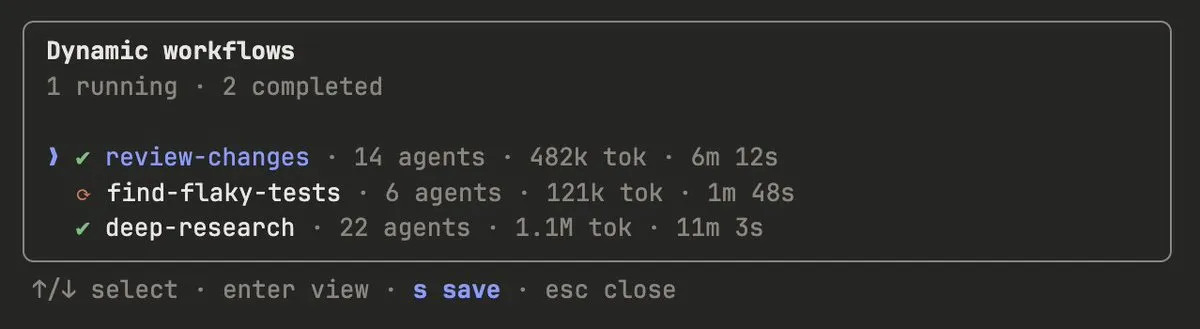
Saved workflows: Via /workflows → press s to save to project (.claude/workflows/, shared with team) or personal (~/.claude/workflows/), then run via /<name>. Supports args parameter input.
Prompting: Using the orchestration mode terminology above (e.g., “adversarial verification”, “tournament”) for specific prompts works better than vague descriptions.
Combine with /goal and /loop: When using repeatable workflows (like triage, research, verification), pair them with /loop for periodic execution and /goal for hard completion requirements.
Token budget: You can set an explicit token usage budget for dynamic workflows to limit the tokens consumed by a task. Prompt with something like “use a 10k token budget” to set a cap.
Save and share: Save by pressing s in the workflow menu. Can be checked into ~/.claude/workflows or distributed via skills — place the JavaScript workflow file in a skill folder and reference it in SKILL.md. For greater flexibility, you can hint Claude to treat the skill’s workflow as a template rather than a script to run verbatim.
Official recommendations:
- Run on a small slice first (one directory rather than the entire repository) to assess token consumption
- Monitor progress and token usage in real-time via
/workflows; can be stopped at any time - For non-critical phases, ask Claude to use smaller models (the
modelparameter can be specified in scripts) - Completed Agent results are cached and not lost when stopped
The essence of Dynamic Workflow is not “Claude spawns lots of Agents”, but rather:
Claude externalizes orchestration decisions into executable script code, executed by an independent runtime, thereby breaking through the context, parallelism, and verification bottlenecks of the single Agent loop.
This marks a critical step for AI coding tools from “assisted coding” to “autonomous engineering”. Current mainstream competitors still remain at the single Agent loop or fixed orchestration stage. The future competitive battleground will not only be model capability, but who has the stronger orchestration runtime.