Alexa Device Onboarding, End to End
A full walkthrough of Alexa device onboarding: ACK hardware, the Smart Home AI Toolkit AI semantic layer, Discover.Response, automatic control-UI generation, three state-sync channels, two-tier OAuth, and publishing.
Alexa is Amazon’s voice-assistant ecosystem. Since launching with the Echo in 2014, it has long existed as a “voice-command engine” — the user speaks a fixed wake word and intent, and Alexa identifies the intent through a pre-trained NLU (natural-language understanding) model and routes it to the corresponding Skill. In February 2025, Amazon announced the next-generation Alexa+ platform, releasing a Preview at the July 2026 Partner Summit. Its core shift can be summarized as:
From “voice-command engine” to “AI Agent platform”
This plays out across three layers:
- Runtime upgrade: The traditional NLU + intent-routing engine is augmented or replaced by an LLM. Previously, a trained semantic-understanding model (non-LLM) performed predefined intent recognition; now an LLM performs dynamic intent recognition, extending the range of understood utterances without retraining and redeploying a model.
- Capability exposure upgrade: Device capabilities are no longer limited to predefined Capability Interfaces (e.g. PowerController / ModeController); device-specific features can be freely declared through an AI semantic-description layer.
- Ecosystem expansion: Through the MCP (Model Context Protocol), third-party providers can offer tools to Alexa+, and Alexa+ can in turn invoke external Agent capabilities.
From a device-onboarding perspective, the Alexa platform offers integration options across two orthogonal layers:
- Hardware / firmware layer: ACK (Alexa Connect Kit), Amazon’s fully-managed device-connectivity solution — no self-built cloud required.
- Software / capability layer: Add-ons, where the manufacturer declares device capabilities for Alexa to recognize and control. Alexa+ adds the Smart Home AI Toolkit here and introduces two new paths: Category SDK and MCP Toolkit.
This article follows the main line “onboarding options → declare capabilities → generate control UI → interaction & sync → publish” to lay out the full device-onboarding flow on the Alexa platform, calling out which parts are new in Alexa+.
ACK is Amazon’s fully-managed device-onboarding solution: no self-built cloud, no Skill development needed to get a device onto Alexa. ACK comes in three hardware forms:
| Form | Architecture | Best for |
|---|---|---|
| ACK Module | Two chips: ACK Module (Amazon firmware, Wi-Fi + certs, UART) + HMCU | Vendors with an existing MCU (coffee makers, microwaves) |
| ACK SDK | Single chip: the vendor SoC runs ACK SDK source | BoM-conscious light/socket OEMs |
| ACK SDK for Matter | Single chip running Matter over Wi-Fi | Vendors also pursuing Matter certification |
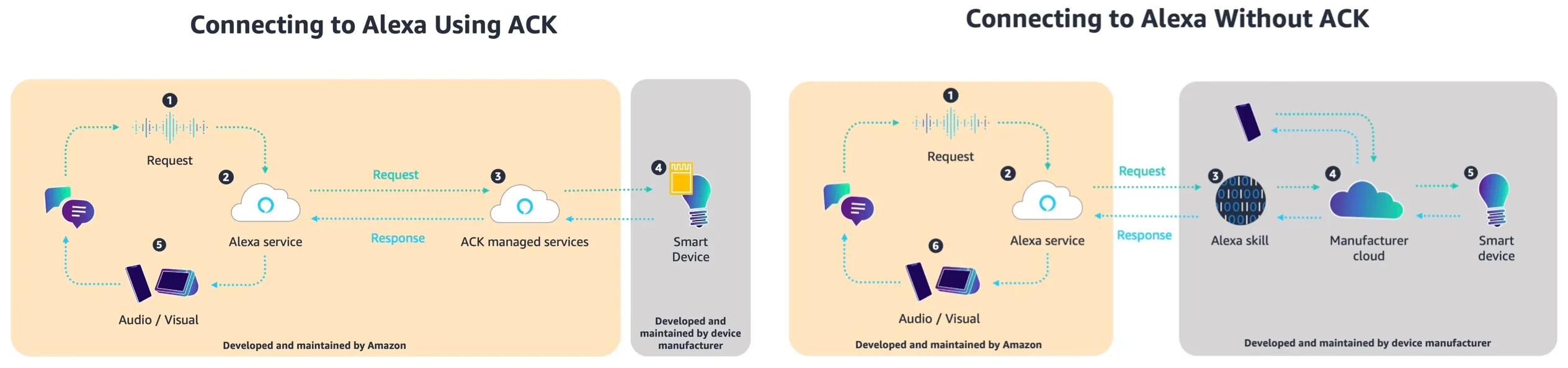
Amazon’s role in ACK is comprehensive:
- Provides the full device-side SDK; the vendor implements only device-level callbacks (e.g. “energize relay / drive motor”)
- Manages the Wi-Fi stack, security certificates, and OTA client
- Hosts the cloud (device registration, OTA, metrics, provisioning)
- One-time per-device fee; no self-built cloud required
ACK is part of Alexa’s traditional device-onboarding story, not within the Alexa+ for Builders Add-on scope, but it is the most hands-off hardware path and is commonly paired with the software-layer Smart Home Add-on.
Alexa+ for Builders currently offers three Add-on integration paths, all in Preview:
| Path | Positioning | Audience | Delivery time |
|---|---|---|---|
| Smart Home AI Toolkit | Device-specific capabilities → AI semantic description | Device manufacturers | hours |
| Category SDK | Six lifestyle-service categories → SPI/MCP contracts | Service providers | weeks |
| MCP Toolkit | Generic MCP service access → tool invocation | Any provider | Existing MCP Server needs only minor changes |
Note: the official blog calls the Smart Home AI Toolkit the AI-powered smart home developer toolkit; the developer docs use both interchangeably. This article sticks with “Smart Home AI Toolkit” for brevity.
The shared trait across all three paths is an AI-first integration paradigm — developers onboard via natural-language description, uploading spec documents, or exposing a standard MCP Server, rather than hand-writing interface code.
Section 2 follows the Smart Home AI Toolkit as the main thread for capability declaration; Category SDK and MCP Toolkit are expanded in Section 6.
Whichever software-layer path you take, the first step is declaring to Alexa “what capabilities this device has.” This is done via Discover.Response.
When Alexa looks for a device, it sends a Discovery request to the vendor’s skill endpoint (e.g. an AWS Lambda). The vendor returns a Discover.Response declaring the device’s capabilities and parameters in endpoints[].capabilities[]. Example, a camera (excerpt):
{ "endpointId": "camera-001", "friendlyName": "Living Room Camera", "displayCategories": ["CAMERA"], "capabilities": [ { "type": "AlexaInterface", "interface": "Alexa.PowerController", "version": "3", "properties": { "supported": [{ "name": "powerState" }], "retrievable": true, "proactivelyReported": true } }, { "type": "AlexaInterface", "interface": "Alexa.CameraStreamController", "version": "3", "cameraStreamConfigurations": [ { "protocols": ["RTSP"], "resolutions": [{ "width": 1920, "height": 1080 }], "authorizationType": "BASIC", "videoCodec": "H264" } ] }, { "type": "AlexaInterface", "interface": "Alexa.RangeController", "version": "3", "instance": "Camera.Pan", "capabilityResources": { "friendlyNames": [{ "@type": "text", "value": { "text": "Pan", "locale": "en-US" } }] }, "properties": { "supported": [{ "name": "rangeValue" }], "retrievable": true, "proactivelyReported": true }, "configuration": { "supportedRange": { "minimumValue": -200, "maximumValue": 200, "precision": 1 } } } ]}The capabilities[] fields that shape the control UI:
| Field | What the vendor configures |
|---|---|
displayCategories | Device category (drives page skeleton layout) |
interface | Which capability protocol the device supports (drives control type, see 2.2) |
instance | Discriminator for multiple instances of the same interface (yields independent controls) |
properties.supported | Which property names this interface reports (the control’s data source) |
properties.retrievable | Whether Alexa may send ReportState to query current values (affects initial value, see 4.1) |
properties.proactivelyReported | Whether property changes send a ChangeReport (affects live refresh, see 4.1) |
configuration | Capability parameters, e.g. supportedRange (min/max/precision), presets |
capabilityResources | Control resources, including icon name and i18n |
cameraStreamConfigurations | Video stream parameters (protocol/resolution/codec/auth) |
nonControllable: true | Read-only flag → the control only displays, no operation |
The interface field determines the control type. Alexa Smart Home predefines a set of Capability Interfaces, each mapping to a set of protocol directives and a UI control:
| interface | Directive set | Inferred control |
|---|---|---|
Alexa.PowerController | TurnOn / TurnOff | Switch |
Alexa.BrightnessController | SetBrightness / AdjustBrightness | Brightness slider |
Alexa.RangeController | SetRangeValue / AdjustRangeValue | Numeric slider |
Alexa.ModeController | SetMode / AdjustMode | Mode selector |
Alexa.ToggleController | TurnOn / TurnOff | Switch (with instance name) |
Alexa.LockController | Lock / Unlock | Lock control (unlock requires auth) |
Alexa.CameraStreamController | InitializeCameraStreams | Video player |
Alexa.MotionSensor | Reports detectionState only | Detection badge |
Alexa.EndpointHealth | Reports connectivity only | Online/offline indicator |
The control type is decided by interface (a black box; the mapping algorithm is not public); the control’s parameters (range/step/name/presets) are set via configuration / capabilityResources (vendor-configurable). The same interface may be declared multiple times, distinguished by instance, each generating an independent control.
The limitation of standard interfaces: device-specific features (a washer’s 30 cycle modes, a camera’s night-vision / human-tracking) can’t be expressed through predefined interfaces. Under the traditional approach, vendors could only shoehorn these into ModeController or RangeController as a fallback, losing semantic information.
The Smart Home AI Toolkit is Alexa+‘s most important addition for the smart home, specifically solving the “custom features that standard interfaces can’t cover” problem. It overlays an AI semantic-description layer on top of standard capabilities:
Traditional: device → Capability Interfaces (standard only) → Alexa NLU (predefined Skill Interaction Model)New: device → Capability Interfaces + AI semantic layer → Alexa+ LLM (NL matching + parameter reasoning)The toolkit introduces two new controller types, carrying “previously unexposable” custom capabilities:
| Controller | Purpose | Examples |
|---|---|---|
Action Controller (Alexa.ActionController) | Trigger a named action or scene | ”Start bedtime mode”, “Rinse filter”, “Begin deep clean” |
Dynamic Controller (Alexa.DynamicController) | Expose a device’s dynamic parameter combinations | Washer mode (wash + temp + spin), AC vent angle |
The key innovation: the semantic space of these two controllers is not predefined. The vendor freely declares semantics, parameter aliases, and natural-language labels in the capability description, and Alexa+‘s LLM handles natural-language matching and parameter reasoning at runtime.
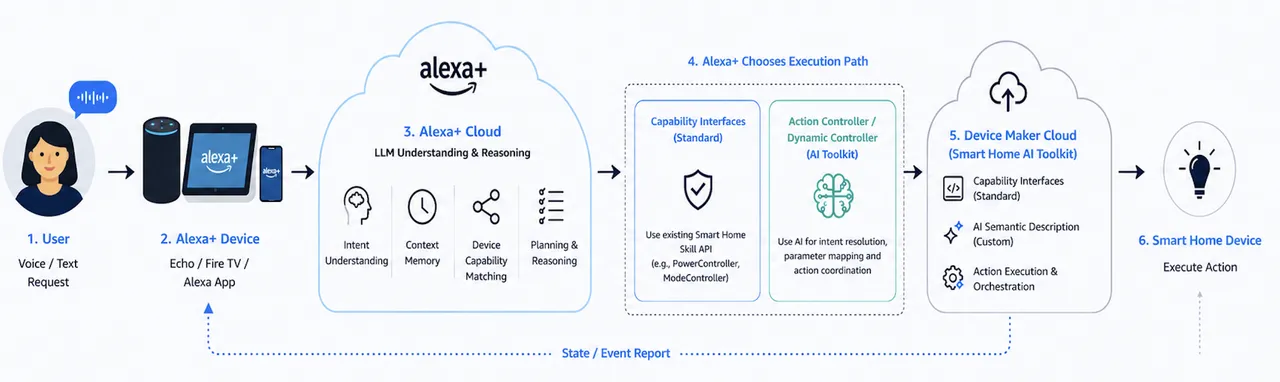
Example — a smart washer declares a device-specific capability:
{ "type": "AlexaInterface", "interface": "Alexa.ActionController", "capabilityResources": { "friendlyNames": [{ "type": "asset", "value": { "assetId": "Alexa.Setting.WashCycle" } }] }, "semantics": { "deviceActions": { "name": "cold_water_enzyme", "description": "A cold-water wash cycle that activates enzyme-based stain removal, suitable for delicate fabrics that require cold washing", "parameters": { "temperature": "cold", "enzyme_activation": true, "spin_speed": "medium" }, "keywords": ["cold wash", "enzyme", "stain removal", "gentle clean", "delicate"] } }, "version": "3"}Note the semantics block — the vendor describes the action’s meaning in natural language via description and keywords, and at runtime Alexa+‘s LLM matches a user utterance (e.g. “give it a gentle cold wash”) to this action and reasons out the parameters. This is the core expression of an LLM runtime replacing the traditional NLU-trained model.
The Smart Home AI Toolkit offers two ways to generate semantic capability descriptions inside the Alexa Developer Console:
| Method | Description | Best for |
|---|---|---|
| Chat & Build | Describe the device’s features in natural language (e.g. “pet feeder, can add food, rinse, show level”), and the Agent auto-generates the semantic description | First-time onboarding / rapid prototyping |
| Upload Specification | Upload a PDF device spec; the LLM auto-extracts capabilities and fills gaps | Vendors with mature product specs |
Both produce the same artifact: a semantic capability description file (structured JSON/YAML) defining the semantics, parameters, natural-language aliases, and UI hints of device-specific capabilities. This file mounts directly onto an existing Smart Home Add-on and is invoked by Alexa+, peer to standard capabilities inside the capabilities array (custom interface names look like Alexa.Custom.AnyCompany.SampleController).
- No extra certification: AI Toolkit-generated capabilities reuse the existing WWA (Works with Alexa) certification scope; new features don’t trigger recertification
- Incremental overlay: nothing is rebuilt — the vendor retains full control over standard Capability Interfaces; the AI semantic description is purely an additional mounted layer
- All in-Portal: everything happens inside the Alexa Developer Console, no local CLI or SDK install
- First partner brands: Bosch, Delta, Ecovacs, Eufy, Govee, iRobot, Moen Flo, PetSafe, Pila Energy, SONOFF, TP-Link Tapo, Twinkly, Whirlpool, Yale Home — covering white goods, cleaning, security, and lighting
Once capabilities are declared, the device control page in the Alexa App is generated automatically — no vendor UI code needed. This is the Alexa Smart Home Catalog Service; the new Smart Home AI Toolkit controllers generate UI the same way.
Vendor declares capabilities (Discover.Response) → Alexa maintains a "capability → UI control" mapping table → Auto-generates the device control pageThree points:
- The vendor declares capabilities; Alexa maintains the capability→UI mapping table and auto-generates the page
- The page has no business logic: the UI only “displays state + translates operations into directives”; real execution lives in the vendor’s cloud function (e.g. Lambda)
- State is kept consistent across 3 channels: pull initial value on page open → write new value on user action → proactive push on device change
After the renderer reads the endpoint declaration:
capabilities array → iterate each interface → each interface (with instance) generates one control → displayCategories decides page skeleton (category icon / control page format) → all controls compose into one pageCamera example, assembly result:
Alexa (base) → no visible controlEndpointHealth → online/offline indicatorCameraStreamController → video playerPowerController → switchMotionSensor → detection badgeRangeController(Pan) → horizontal slider (-200~200)RangeController(Tilt) → vertical slider (-50~50)Custom: NightVision → AI-generated switchCustom: HumanTracking → AI-generated buttonResulting UI structure:
┌─────────────────────────────────────────┐│ ● Online Living Room Cam ⚙️ │ ← EndpointHealth + friendlyName├─────────────────────────────────────────┤│ ┌─────────────────┐ ││ │ Stream (RTSP) │ │ ← CameraStreamController│ │ 1080p / H.264 │ ││ └─────────────────┘ │├──────────────────┬──────────────────────┤│ ◉ Power │ ⚠ Motion: clear │ ← PowerController + MotionSensor├──────────────────┴──────────────────────┤│ Pan ◄━━━━━━━━━●━━━━━━━━━► -200~200 │ ← RangeController(Camera.Pan)│ Tilt ◄━━━━●━━━━━━━━━━━━━━► -50~50 │ ← RangeController(Camera.Tilt)├─────────────────────────────────────────┤│ 🌙 Night Vision [ON/OFF] 👤 Tracking [Start] │ ← Custom (AI Toolkit-generated)└─────────────────────────────────────────┘Custom-capability UI is likewise generated by the AI Toolkit’s Generate UI feature; the vendor can add/remove/edit UI elements conversationally, and the artifact is peer to standard capabilities.
Once a control is generated, its interaction behavior is defined by the interface protocol — no vendor UI logic needed. Handlers all live in the vendor Lambda; the UI only “renders property values + translates operations into protocol directives.” Interaction logic splits into two parts: state sync and event interaction.
The sync mechanism between the UI and device state:
- Read (pull initial value on page open): the Alexa App sends
ReportState→ the vendor Lambda returns aStateReport(within 8s, properties tagged with namespace + instance) → each control initializes - Write (set new value on user action): the App sends a directive like
SetRangeValue(header includes instance) → Lambda invokes the device → returnsAlexa.Response(context contains the new value) → control updates - Push (proactive report on device change): device state changes (physical operation / control from another client) → Lambda sends a
ChangeReport(within 3s, only changed properties) → App pushes → control refreshes
Timing:
① Read · opening the control page (ReportState → StateReport)App ──ReportState──> Cloud ──> Lambda ──StateReport(within 8s)──> Cloud ──> App                                                              (controls initialize)
② Write · user action (Directive → Response)App ──SetRangeValue(instance)──> Cloud ──> Lambda ──> device executesApp <──Response + new state──── Cloud <──Alexa.Response── Lambda(slider updates to new value)
③ Push · device state change (ChangeReport, may occur anytime)Device ──state change──> Lambda ──ChangeReport(within 3s)──> Cloud ──push──> App                                                              (control refreshes live)
properties.retrievable determines whether an initial value can be pulled (read channel); properties.proactivelyReported determines whether live refresh works (push channel) — both flags are set at capability-declaration time.
Events on a control fall into three categories by where they’re handled:
| Event domain | Handling location | Examples |
|---|---|---|
| App domain | App local | Page navigation, tab switching, expand/collapse |
| Device domain | Lambda + protocol | Motion detected, switch/PTZ state change |
| Mixed domain | App local confirm → protocol → Lambda | Unlock auth, privacy-mask confirm |
- App-domain events (purely local): page navigation (home → settings), tab switching, expand/collapse, animations, cache reads — the App’s own navigation/UI logic, not through the protocol layer, unrelated to device capabilities.
- Device-domain events (via protocol): device state changes (physical operation / other-client control) → the device side sends a
ChangeReport→ UI refreshes. - Mixed-domain events (local confirm first, then protocol): operations requiring safety confirmation. The canonical example, a smart-lock unlock:
User says "unlock the front door" → App layer: require a 4-digit voice code (local auth, "confirmation for the human") → pass → send Alexa.LockController.Unlock directive → Lambda layer: verify token permissions (server-side auth, "the real check") pass → execute → Alexa.Response + state snapshot deny → Alexa.ErrorResponse → UI errorAuth is two-tier: the App layer does interaction confirmation; the Lambda layer does server-side verification. The camera case is analogous: a second confirmation before privacy mask; PTZ operations are rejected while privacy mode is on.
Once capability declaration and control-UI generation are complete, the device enters the publishing flow:
- Listing review: Amazon reviews the device capabilities, semantic descriptions, and UI to ensure they meet the Alexa UX guidelines
- Publish parameters: AI Toolkit’s Chat & Build / Upload Specification, alongside the capability description, also generates the publish parameters, NLU matching corpus, App control-UI config, and i18n copy needed for listing
- Certification: standard capabilities must pass WWA (Works with Alexa) certification; AI Toolkit-added custom capabilities reuse the existing WWA scope, no recertification
- Go live: after approval, the device is listed in the Alexa App and users can discover and control it
The Category SDK is a standardized onboarding framework for lifestyle-service categories, supporting six categories:
| Category | Description | Path |
|---|---|---|
| Food ordering | Order food | Action (SPI) |
| Home services | Home services | Action (SPI) |
| Local booking | Book local services & activities | Action (SPI) |
| Restaurant reservations | Book a restaurant | Action (SPI) |
| Ride booking | Book rides | MCP only |
| Ticketing | Buy event tickets | Action (SPI) |
The Category SDK offers two sub-paths:
- Category Action Add-on: connects vendor APIs via SPI (Service Provider Interface) contracts — low latency, strong resilience, suited to partners with established APIs
- Category MCP Add-on: connects the vendor’s MCP server via the standard MCP protocol — suited to partners who already have an MCP server or prefer that standard
Note that Ride booking can only go through MCP, not SPI. The developer workflow is: implement/deploy (Alexa AI CLI + AWS) → test (web simulator + E2E device testing) → launch (certification → publish → monitor).
The MCP Toolkit lets any provider connect an existing MCP server to Alexa+, so customers can use those capabilities through voice and visual interactions.
Architecture: the vendor deploys an MCP server (exposing tools/resources/prompts) + an Alexa+ MCP Add-on (a bridge between the MCP server and Alexa+, handling protocol translation and capability registration) + an add-on registry (indexing tools; Alexa+ AI reasoning decides when to invoke them) + an Orchestrator (coordinating the experience).
Transport: Streamable HTTP (no stdio / WebSocket). It follows the 2025-11-25 MCP spec and supports the MCP Apps extension (rendering interactive UIs inline in the conversation view — maps, multi-step flows, dashboards).
Onboarding: via the add-on Agent Skill (agentic onboarding) or the Alexa AI CLI; Alexa+ inspects the MCP server, proposes an integration path, and delivers a simulator-ready package. Tool changes require redeploying with alexa-ai deploy.
Auth: two-tier OAuth 2.0:
| Tier | Grant type | Purpose | User involved? |
|---|---|---|---|
| Tier 1 | client_credentials | Service-level M2M auth, for private MCP servers’ registration/health checks, tool discovery (initialize, tools/list), non-user data queries | No |
| Tier 2 | authorization_code + PKCE | User-level auth & consent, for executing user-specific tools and accessing user resources | Yes |
- Tier 1 tokens are short-lived (recommended ≤ 3600s), no refresh_token is issued — request a new token on expiry; scope is
mcp:service - Tier 2 scope is
mcp:tools/mcp:resources - Dynamic Client Registration (DCR), OpenID Connect (OIDC), and Step-Up Authorization are not supported
- If auth attributes change server-side, the MCP Add-on must be redeployed (Alexa+ caches values until then)
The MCP Toolkit is currently available in the United States only.
The core chain of Alexa device onboarding is “declare capabilities → generate control UI → interaction & state sync → publish.” The traditional Smart Home mechanisms (Discover.Response, Capability Interfaces, StateReport/ChangeReport) handle standard-capability onboarding, while Alexa+‘s Smart Home AI Toolkit extends capability exposure from predefined interfaces to arbitrary custom features via the AI semantic-description layer — Alexa+‘s most important increment.
On top of this, the Category SDK extends the same AI Agent framework to lifestyle-service categories, and the MCP Toolkit plugs into the broader AI Agent ecosystem via an open protocol. All three share an AI-first trait: developers replace hand-written interface code with natural language and documents, and the LLM handles intent understanding and parameter reasoning at runtime.
| Term | Full name / note |
|---|---|
| ASK | Alexa Skills Kit, Alexa skill development toolkit |
| AVS | Alexa Voice Service, service for embedding Alexa into third-party hardware |
| ACK | Alexa Connect Kit, fully-managed device-onboarding solution with no Skill, no cloud |
| Smart Home Add-on | formerly Smart Home Skill, device onboarding via Capability Interfaces |
| Smart Home AI Toolkit | Alexa+ addition, AI-semantic capability exposure (Preview); officially AI-powered smart home developer toolkit |
| Action Controller | Smart Home AI Toolkit’s new controller, triggers named actions |
| Dynamic Controller | Smart Home AI Toolkit’s new controller, exposes dynamic parameter combinations |
| Category SDK | Standardized onboarding framework for six categories (Preview) |
| MCP | Model Context Protocol, open standard for AI models to interact with external tools |
| MCP Toolkit | Alexa+‘s generic service-access toolkit based on MCP |
| Capability Interfaces | Alexa Smart Home’s standard capability interface system |
| WWA | Works with Alexa, device-control certification |
| SPI | Service Provider Interface, the Category SDK’s contract interface |
| Discover.Response | Capability declaration structure returned during device discovery |
| StateReport / ChangeReport | The two state-reporting messages: full query / incremental push |
Official Amazon docs referenced in this article, listed in the order the topics appear, for deeper reading per section: