Google Motion Photo ↔ Apple Live Photo 格式互转实战
本文系统梳理 Google Motion Photo 与 Apple Live Photo 的文件结构、元数据约定与互转路径,给出以“尽可能无损”为目标的两向转换方案,覆盖 HDR GainMap 与深度等 Auxiliary Data 的保留策略与能力边界,并提供可复用的 Swift 包与示例代码。
本文系统梳理 Google Motion Photo 与 Apple Live Photo 的文件结构、元数据约定与互转路径,给出以“尽可能无损”为目标的两向转换方案,覆盖 HDR GainMap 与深度等 Auxiliary Data 的保留策略与能力边界,并提供可复用的 Swift 包与示例代码。
结论先行:转换过程并非无损,当图片中包含其他信息时,对方的数据格式无法承载当前信息,则会丢失。尤其在 UltraHDR(JPEG + GainMap) → HEIC(GainMap) 及 HEIC(Depth) → Motion Photo 两个方向。推荐策略是优先保留原始容器与附加图像数据;当必须跨容器时,采用“元数据与视频无重编码拷贝 + 静图最低限度重编码/抽取 + 显式写入配对/偏移元数据”的组合路径。
- 静态图:
JPEG主图像 - 可选增益图:
JPEGHDR GainMap(UltraHDR) - 动态视频:
MP4字节流直接拼接在 JPEG 尾部(同一文件) - 关键 XMP(命名空间
GCamera/GContainer,不同机型/版本略异):
| XMP 键 | 类型 | 说明 |
|---|---|---|
GCamera:MotionPhoto | Integer | 1 表示动态照片;0/缺省表示普通静图 |
GCamera:MotionPhotoVersion | Integer | 动态照片文件格式版本 |
GCamera:MicroVideo | Integer | 早期规范,已废弃。布尔开关,指示是否为动态图片 |
GCamera:MicroVideoVersion | Integer | 早期规范,已废弃。MicroVideo 元数据版本,常见值为 1 |
GCamera:MicroVideoOffset | Long | 早期规范,已废弃。尾部 MP4 的起始偏移量(字节) |
GCamera:MicroVideoPresentationTimestampUs | Long | 早期规范,已废弃。与静图对齐的视频帧时间戳(微秒,可为 -1) |
GContainer:Directory + Item:Length | Struct | 描述主图、增益图、视频等语义项及其长度 |
规范演进中,
GContainer:Directory的Item:Length可在缺少MicroVideoOffset时辅助定位视频起始位置。
典型 Motion Photo 的 XMP 段:
<x:xmpmeta xmlns:x="adobe:ns:meta/" x:xmptk="Adobe XMP Core 5.1.0-jc003"> <rdf:RDF xmlns:rdf="http://www.w3.org/1999/02/22-rdf-syntax-ns#"> <rdf:Description rdf:about="" xmlns:hdrgm="http://ns.adobe.com/hdr-gain-map/1.0/" xmlns:Container="http://ns.google.com/photos/1.0/container/" xmlns:Item="http://ns.google.com/photos/1.0/container/item/" xmlns:GCamera="http://ns.google.com/photos/1.0/camera/" hdrgm:Version="1.0" GCamera:MotionPhoto="1" GCamera:MicroVideoVersion="1" GCamera:MicroVideo="1" GCamera:MicroVideoOffset="9871716" GCamera:MicroVideoPresentationTimestampUs="926668"> <Container:Directory> <rdf:Seq> <rdf:li rdf:parseType="Resource"> <Container:Item Item:Semantic="Primary" Item:Mime="image/jpeg"/> </rdf:li> <rdf:li rdf:parseType="Resource"> <Container:Item Item:Semantic="GainMap" Item:Mime="image/jpeg" Item:Length="243988"/> </rdf:li> <rdf:li rdf:parseType="Resource"> <Container:Item Item:Semantic="MotionPhoto" Item:Mime="video/mp4" Item:Length="9871716"/> </rdf:li> </rdf:Seq> </Container:Directory> </rdf:Description> </rdf:RDF></x:xmpmeta>示例 HEIC Motion Photo 结构

- 静态图:
HEIC(优先)或JPEG - 动态视频:独立
MOV(H.264/HEVC,通常包含音频轨) - 可选 Auxiliary:HEIC 中可携带 Depth、Segmentation、GainMap 等辅助平面
- 关键配对标识(要求静图与视频一致):
ContentIdentifier(HEIC:Apple XMP;MOV:QuickTime Metadata)StillImageTime(MOV 静帧时间戳,常设0)
示例 HEIC Live Photo 结构
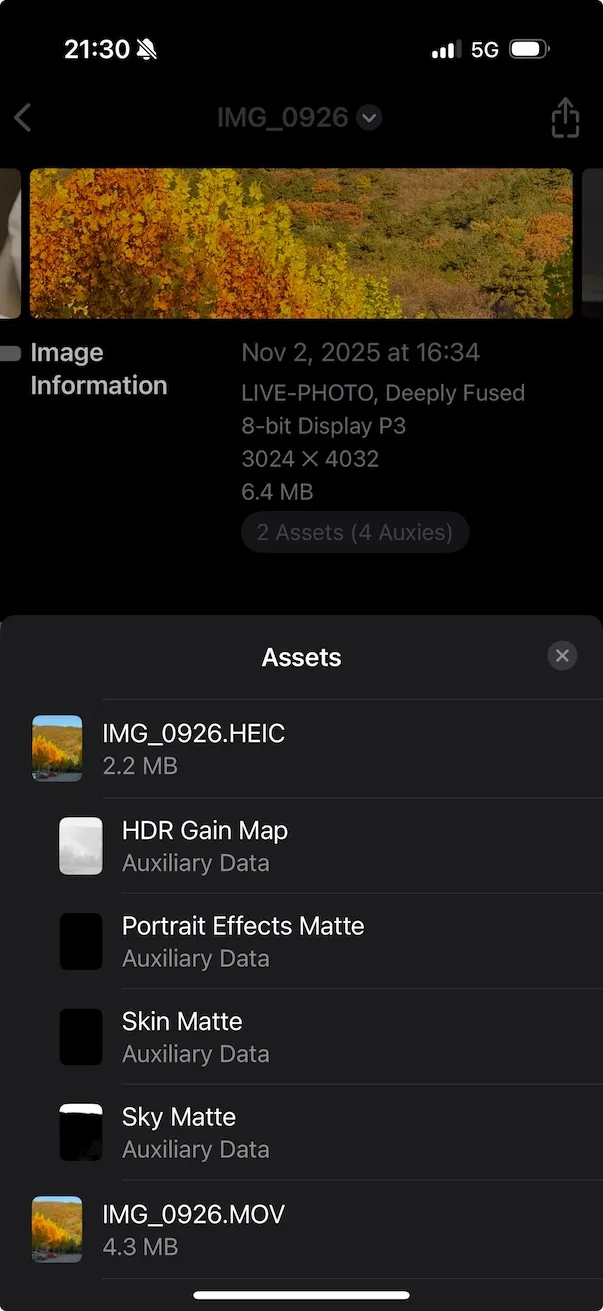
- 视频:直接无重编码拷贝到
mov(容器改封装)。 - 静图:保留
JPEG可直接作为 Live Photo 静图(iOS 可识别);如需HEIC,仅在确有需求时转换。 - HDR GainMap:
- 若源为 Google UltraHDR(JPEG 内含 GainMap),目前通用工具对“JPEG GainMap → HEIC GainMap”自动迁移支持有限;建议保留 JPEG 静图(牺牲 iOS 上的系统级 HDR 呈现),或使用实验性库迁移(见“高级:HDR 迁移”)。
- 深度/语义分割等 Auxiliary:Motion Photo(JPEG 容器)通常不带 HEIF 风格的 Auxiliary 图像,迁移为 HEIC 时需要新增辅助图像(见“高级:Auxiliary 迁移”)。
- 视频:
MOV → MP4无重编码拷贝。 - 静图:若为
HEIC,可转换为JPEG作为 Motion Photo 主图(会丢失 HEIC 的原生 Auxiliary,如 Depth/GainMap)。 - HDR/Depth:Motion Photo(JPEG 容器)缺乏标准化的 HEIF Auxiliary 承载;转换到 JPEG 后,HDR GainMap 与 Depth 通常难以“等价”保存(除非迁移为自定义 XMP/APP 区段,生态支持较弱)。
为便于在 App 或工具中复用,这里给出一个 Swift Package 的设计与核心实现示例,统一完成 Live Photo 与 Motion Photo 的互转。元数据读写采用 Exiv2(C++)实现,Swift 通过 C 接口桥接;相册写入使用 Photos.framework。
MotionLiveKit/├─ Package.swift├─ Sources/│ └─ MotionLiveKit/│ ├─ MotionLiveKit.swift # 公共 API(Swift)│ ├─ LivePhotoConverter.swift # Live Photo 方向实现│ ├─ MotionPhotoConverter.swift # Motion Photo 方向实现│ ├─ PhotosWriter.swift # 相册写入(iOS/macOS Photos)│ ├─ FileIO.swift # 沙盒/临时文件与校验│ ├─ Exiv2Bridge.h # C 桥接头(给 Swift 调用)│ ├─ Exiv2Bridge.cpp # C++ 实现,调用 Exiv2│ └─ include/module.modulemap # 模块映射(如需要)└─ Externals/ └─ exiv2/ # 编译产物或子模块(静态库+头文件)import PackageDescription
let package = Package( name: "MotionLiveKit", platforms: [ .iOS(.v15), .macOS(.v12) ], products: [ .library(name: "MotionLiveKit", targets: ["MotionLiveKit"]) ], targets: [ .target( name: "MotionLiveKit", dependencies: [], path: "Sources/MotionLiveKit", publicHeadersPath: ".", cSettings: [ .headerSearchPath("."), .headerSearchPath("../Externals/exiv2/include") ], cxxSettings: [ .headerSearchPath("."), .headerSearchPath("../Externals/exiv2/include"), .define("EXIV2_ENABLE_XMP") ], linkerSettings: [ .linkedLibrary("c++"), .linkedLibrary("z"), .linkedLibrary("iconv"), .linkedLibrary("expat"), .linkedLibrary("exiv2") ] ) ])注意:linkedLibrary("exiv2") 要与实际集成方式一致(见 3.6)。
public struct MotionLiveKit {    public enum MLKError: Error {        case invalidInput        case metadataReadFailed        case metadataWriteFailed        case muxFailed        case demuxFailed        case fileIOFailed        case photoAuthorizationDenied    }
    public struct LivePhotoPair {        public let stillURL: URL   // HEIC 或 JPEG        public let videoURL: URL   // MOV        public let contentIdentifier: String        public init(stillURL: URL, videoURL: URL, contentIdentifier: String) {            self.stillURL = stillURL            self.videoURL = videoURL            self.contentIdentifier = contentIdentifier        }    }
    public static func motionToLive(motionJPG: URL, preferHEIC: Bool = false, workDir: URL? = nil) async throws -> LivePhotoPair    public static func liveToMotion(still: URL, videoMOV: URL, outputJPG: URL) async throws -> URL
// iOS/macOS: 写入系统照片库(需要 Photos 权限) #if canImport(Photos) @discardableResult public static func saveLiveToPhotos(_ pair: LivePhotoPair) async throws -> String #endif}- 对应 API/模块:
- 读取/写入图像 XMP:
Exiv2Bridge(C/C++) - MOV 元数据写入:
writeMOVPairing(AVFoundation) - 高层入口:
MotionLiveKit.motionToLive、MotionLiveKit.liveToMotion
- 读取/写入图像 XMP:
-
Motion → Live:
- 解析 JPEG 中 XMP,读取
MicroVideoOffset;分离尾部 MP4 到临时motion.mp4;使用 AVAssetExport 改封装为motion.mov(passthrough无重编码)。 - 主图:保留 JPEG 直接用作 still;如
preferHEIC,使用CoreImage + ImageIO或集成libheif转为 HEIC(重编码)。 - 写入配对元数据:
- 静图(HEIC/JPEG)写入
Apple:ContentIdentifier - MOV 写入
QuickTime:ContentIdentifier与QuickTime:StillImageTime=0
- 静图(HEIC/JPEG)写入
- 以上元数据通过 Exiv2Bridge 实现(详见 3.7)。
- 解析 JPEG 中 XMP,读取
-
Live → Motion:
- 若静图为 HEIC,则转为 JPEG(重编码,不可逆);
- MOV → MP4 改封装(无重编码);
- 计算 JPEG 字节数,拼接
JPEG + MP4输出motion_photo.jpg; - 写入
XMP-GCamera:MotionPhoto=1、MicroVideoOffset等键。
Exiv2 是 C++ 库,需编译为静态库并随包分发,或作为子模块集成。
- macOS(x86_64/arm64 通用):
- 使用 CMake:
cmake -DCMAKE_BUILD_TYPE=Release -DEXIV2_ENABLE_XMP=ON -DEXIV2_BUILD_SHARED_LIBS=OFF ..,make后得到libexiv2.a与头文件。
- 使用 CMake:
- iOS(device + simulator):
- 使用 CMake 工具链或 Xcode Toolchain,为
arm64、x86_64(模拟器)各编译一份libexiv2.a; - 通过
lipo -create合并为libexiv2_universal.a,或使用 XCFramework:xcodebuild -create-xcframework -library libexiv2_ios.a -headers include -library libexiv2_sim.a -headers include -output Exiv2.xcframework
- 在 SPM 目标
linkerSettings使用.linkedFramework("Exiv2")或通过.binaryTarget引入 XCFramework(若采用二进制方式)。
- 使用 CMake 工具链或 Xcode Toolchain,为
依赖项(常见):z、iconv、expat。编译参数需与 Exiv2 版本匹配;若需写入 XMP,务必启用 EXIV2_ENABLE_XMP 宏。
Exiv2Bridge.h
#pragma once#include <stddef.h>#ifdef __cplusplusextern "C" {#endif
// 读取 JPEG 中的 GCamera MicroVideoOffset;返回 -1 表示失败long mlk_read_micro_video_offset(const char* jpg_path);
// 为 JPEG/HEIC 写 Apple:ContentIdentifier(返回0成功)int mlk_write_content_identifier(const char* image_path, const char* uuid_str);
// 为 MOV 写 QuickTime:ContentIdentifier 与 StillImageTime=0(返回0成功)int mlk_write_mov_pairing(const char* mov_path, const char* uuid_str, double still_time);
// 写入 GCamera XMP(MotionPhoto=1,MicroVideoOffset=off)int mlk_write_motion_xmp(const char* jpg_path, long offset);
#ifdef __cplusplus}#endifExiv2Bridge.cpp(伪代码要点)
#include "Exiv2Bridge.h"#include <exiv2/exiv2.hpp>
long mlk_read_micro_video_offset(const char* jpg_path) {    try {        auto image = Exiv2::ImageFactory::open(jpg_path);        image->readMetadata();        auto& xmp = image->xmpData();        auto it = xmp.findKey(Exiv2::XmpKey("Xmp.GCamera.MicroVideoOffset"));        if (it != xmp.end()) return it->toLong();    } catch (...) {}    return -1;}
int mlk_write_content_identifier(const char* image_path, const char* uuid_str) {    try {        auto image = Exiv2::ImageFactory::open(image_path);        image->readMetadata();        auto& xmp = image->xmpData();        xmp["Xmp.apple.ContentIdentifier"] = std::string(uuid_str);        image->setXmpData(xmp);        image->writeMetadata();        return 0;    } catch (...) { return -1; }}
int mlk_write_mov_pairing(const char* mov_path, const char* uuid_str, double still_time) {    // Exiv2 对 MOV/QuickTime 的写支持有限,可选:    // 1) 使用 Exiv2 QuickTime 支持(若版本具备)。    // 2) 退回 AVFoundation 写入 metadata(Swift 侧处理)。    return -1;}
int mlk_write_motion_xmp(const char* jpg_path, long offset) {    try {        auto image = Exiv2::ImageFactory::open(jpg_path);        image->readMetadata();        auto& xmp = image->xmpData();        xmp["Xmp.GCamera.MotionPhoto"] = 1;        xmp["Xmp.GCamera.MotionPhotoVersion"] = 1;        xmp["Xmp.GCamera.MicroVideo"] = 1;        xmp["Xmp.GCamera.MicroVideoVersion"] = 1;        xmp["Xmp.GCamera.MicroVideoOffset"] = static_cast<int64_t>(offset);        image->setXmpData(xmp);        image->writeMetadata();        return 0;    } catch (...) { return -1; }}
注:对 MOV 的元数据,推荐在 Swift 侧用 AVFoundation 写入 QuickTime UserData/Metadata(更稳定)。
写 MOV 配对(AVFoundation):
import AVFoundation
func writeMOVPairing(movURL: URL, contentID: String, stillTime: Double = 0) throws {    let asset = AVURLAsset(url: movURL)    let metadata = [        AVMutableMetadataItem().apply { item in            item.keySpace = .quickTimeMetadata            item.key = AVMetadataKey.quickTimeMetadataKeyContentIdentifier as (NSCopying & NSObjectProtocol)?            item.value = contentID as (NSCopying & NSObjectProtocol)?        },        AVMutableMetadataItem().apply { item in            item.keySpace = .quickTimeMetadata            item.key = AVMetadataKey.quickTimeMetadataKeyStillImageTime as (NSCopying & NSObjectProtocol)?            item.value = stillTime as NSNumber        }    ]    let outURL = movURL.deletingLastPathComponent().appendingPathComponent("tmp_\(UUID().uuidString).mov")    let exporter = try AVAssetExportSession(asset: asset, presetName: AVAssetExportPresetPassthrough).unwrap()    exporter.outputURL = outURL    exporter.outputFileType = .mov    exporter.metadata = metadata    let group = DispatchGroup(); group.enter()    exporter.exportAsynchronously { group.leave() }    group.wait()    guard exporter.status == .completed else { throw MotionLiveKit.MLKError.metadataWriteFailed }    try FileManager.default.replaceItemAt(movURL, withItemAt: outURL)}
extension Optional {    func unwrap() throws -> Wrapped { if let v = self { return v }; throw MotionLiveKit.MLKError.invalidInput }}
extension AVMutableMetadataItem { func apply(_ block: (AVMutableMetadataItem) -> Void) -> AVMutableMetadataItem { block(self); return self }}写入 Live Photo 到系统相册(iOS/macOS Photos):
import Photos
public func saveLiveToPhotos(_ pair: MotionLiveKit.LivePhotoPair) async throws -> String {    let status = await PHPhotoLibrary.requestAuthorization(for: .readWrite)    guard status == .authorized || status == .limited else { throw MotionLiveKit.MLKError.photoAuthorizationDenied }    var localIdentifier = ""    try await PHPhotoLibrary.shared().performChanges {        let req = PHAssetCreationRequest.forAsset()        let stillRes = PHAssetResourceCreationOptions()        let vidRes = PHAssetResourceCreationOptions()        req.addResource(with: .photo, fileURL: pair.stillURL, options: stillRes)        req.addResource(with: .pairedVideo, fileURL: pair.videoURL, options: vidRes)        localIdentifier = req.placeholderForCreatedAsset?.localIdentifier ?? ""    }    return localIdentifier}
沙盒持久化目录:
let documents = FileManager.default.urls(for: .documentDirectory, in: .userDomainMask).first!// 例如:documents.appendingPathComponent("MotionOutputs")Motion Photo → Live Photo:
let input = URL(fileURLWithPath: "/path/to/input_motion.jpg")let pair = try await MotionLiveKit.motionToLive(motionJPG: input, preferHEIC: false)#if canImport(Photos)let id = try await MotionLiveKit.saveLiveToPhotos(pair)print("saved: \(id)")#endifLive Photo → Motion Photo:
let still = URL(fileURLWithPath: "/path/to/IMG_0001.HEIC")let mov = URL(fileURLWithPath: "/path/to/IMG_0001.MOV")let out = FileManager.default.urls(for: .documentDirectory, in: .userDomainMask).first!.appendingPathComponent("motion_photo.jpg")let jpg = try await MotionLiveKit.liveToMotion(still: still, videoMOV: mov, outputJPG: out)print("motion photo at: \(jpg.path)")- Exiv2 对 MOV 的写支持因版本而异;推荐 MOV 元数据用 AVFoundation 写入,图像(JPEG/HEIC)用 Exiv2 写入。
- HEIC→JPEG 属于重编码;若要尽可能“无损”,应保留 JPEG/HEIC 的原始容器并仅改封装视频轨道与元数据。
- HDR GainMap/Depth 的迁移需额外工作:上述包提供基础元数据通路,不包含 GainMap/Depth 的跨容器重建。
- 现状:桌面端通用工具对“读取 JPEG APP 区的 GainMap 并转换为 HEIF Auxiliary:GainMap”支持有限。
- 建议:
- 若目标是 iOS 端观看,优先使用原生 HEIC(若来源已有);
- 若来源仅有 UltraHDR JPEG,需要迁移到 HEIC 的 HDR 呈现,可评估基于
libultrahdr/厂商工具的实验性转换,验证显示效果与系统兼容性; - 在不可行时,采用 SDR 主图(保真主观观感)+ 保留原文件备份。
- 提取与注入通常需要 HEIF 级别操作(libheif/专用 SDK)。
- 常见辅助类型(示例,不同设备命名可能不同):
- Depth:
urn:mpeg:hevc:2015:auxid:depth - Disparity:
urn:mpeg:hevc:2015:auxid:depthmap - Alpha/Segmentation:
urn:mpeg:hevc:2015:auxid:alpha
- Depth:
- 转到 Motion Photo(JPEG)方向时,很难等价承载这些 Auxiliary;如业务必须,通常转存为独立旁挂文件或自定义 XMP 块(生态支持弱)。
- iOS 无法识别 Live Photo:检查两端的
ContentIdentifier是否一致;StillImageTime是否存在且为数值。 - Pixel 无法识别 Motion Photo:确认
MicroVideoOffset是否为拼接前 JPEG 的精确字节数;确保视频放在 JPEG 之后。 - 转 HEIC 后色彩/对比变化:重编码与色彩空间/ICC 配置导致,注意保留源 ICC,并在编码路径选择高质量与高位深。
- HDR 不生效:属于 GainMap 迁移能力缺口或目标系统不支持该承载方式。
- 优先选择“容器改封装 + 元数据重写”的最小改动路径。
- 跨生态迁移前,先在目标设备/应用实机验收(照片 App、Google Photos、社交平台)。
- 保留原文件完整备份;在产线中记录每步转换日志、校验哈希。
Motion Photo 与 Live Photo 的互转,关键在于理解两个生态的文件结构、编码策略与元数据契约。实践中遵循“无重编码优先、精准写元数据、保留原文件”的原则,可在兼容性与画质之间取得平衡;对 HDR GainMap、Depth 等高级特性,则需结合业务需求与工具链能力,保留原始数据并逐步迭代迁移方案。