Introduction to HLS Protocol
A guide to HTTP Live Streaming (HLS) protocol covering its architecture, file formats (TS and fMP4), playback modes (VOD and live streaming), security with FairPlay, and practical setup using mediastreamsegmenter and ffmpeg.
HLS stands for HTTP Live Streaming, an HTTP-based streaming media transport protocol proposed by Apple. It supports both live streaming and on-demand playback, as well as multiple resolutions, dual audio/video tracks, subtitles, and more. Its principle is to split an entire video into multiple small segments, and the complete playback is assembled from these individual fragments.
The HLS protocol specifies:
- The video container format is
TS. - The video encoding format is
H264, and the audio encoding formats areMP3,AAC, orAC-3. - In addition to the
TSvideo files themselves, it definesm3u8files (text files) used to control playback.
Advantages:
- Bypasses firewall restrictions in certain scenarios
- Easy server scaling.
RTMPis a stateful protocol, making it difficult to scale video servers smoothly because it needs to maintain state for each client streaming video.HLS, on the other hand, is based on a stateless protocol (HTTP). Clients simply download ordinaryTSfiles stored on the server in sequence, making load balancing as straightforward as load balancing for a regularHTTPfile server - Adaptive bitrate streaming
Disadvantages:
- High latency in live streaming scenarios (no latency impact for on-demand content)
- A large number of
TSsegment files can put pressure on server storage and request handling
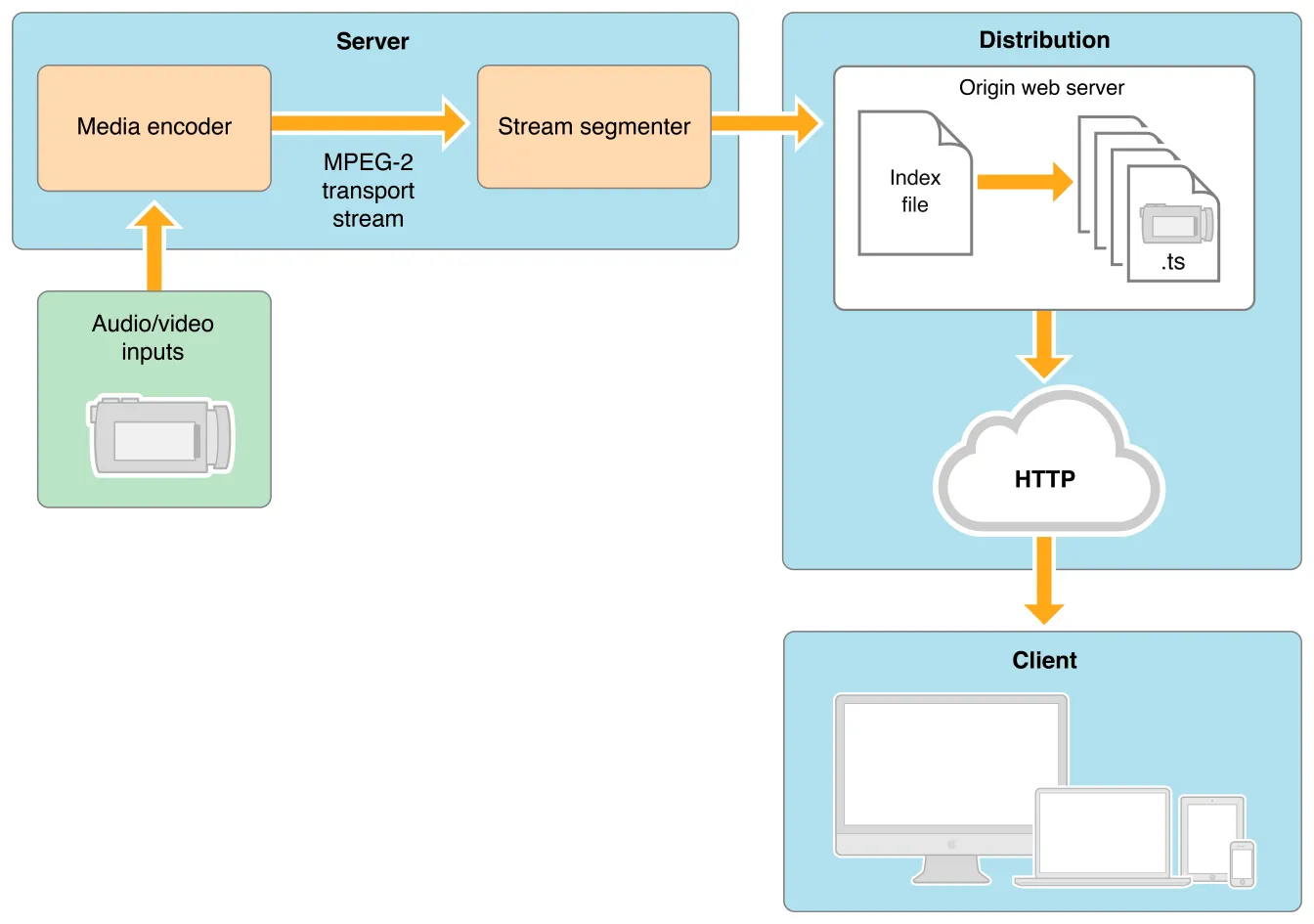 HLS Live Streaming Workflow
- AVInputs
Capture audio and video sources
- Server
The server component is responsible for obtaining the media input stream, then encoding it into MPEG-4 (H.264 video and AAC audio) format, which is then hardware-packaged into an MPEG-2 transport stream. As shown in the diagram, the transport stream passes through the stream segmenter, whose job is to split the MPEG-2 transport stream into small segments and save them as one or more series of .ts media files. This process requires encoding tools such as the Apple stream segmenter.
The video is in fmp4 format (newer) or ts format (older), while pure audio is encoded into small audio fragments, typically in AAC with ADTS headers, MP3, or AC-3 format.
The server side can use either hardware encoding or software encoding. Both function to slice existing media files according to the rules described above and manage them using index files. Software slicing typically uses tools provided by Apple or third-party integrated tools.
- Distribution
Provides HTTP service, hosting the m3u8 index files and ts segment files created by the Server
- Clients
Request
m3u8resources
The HLS protocol includes two types of files: index files and ts/fMP4 files
There are two types:
- Index file
- Alternate Index file
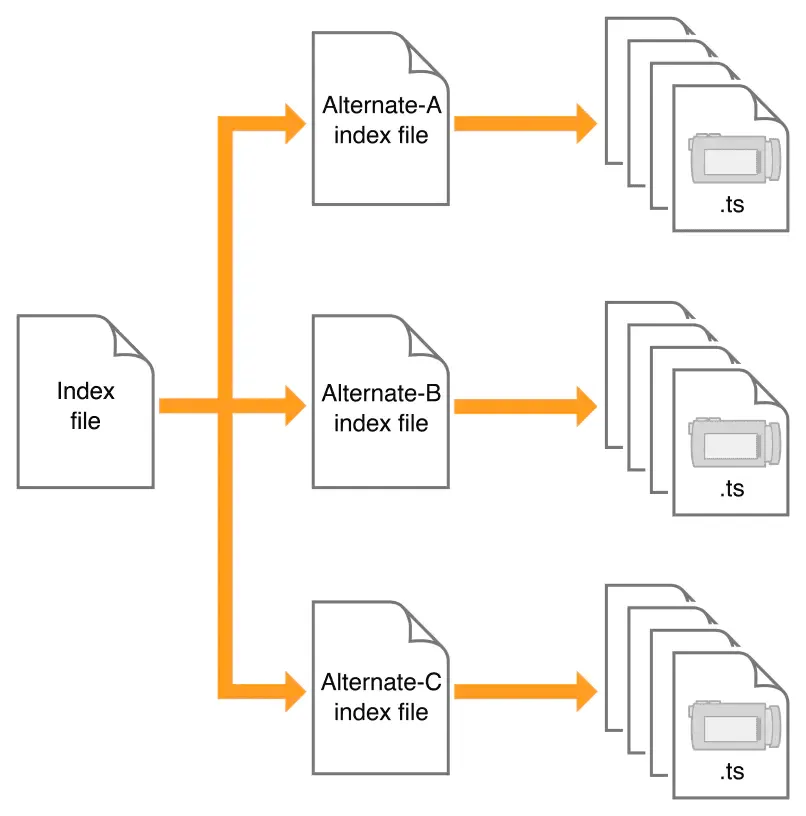 HLS Index
Each ts file consists of several ts packets, and each ts packet is 188 bytes.
Reason: For compatibility with ATM (Asynchronous Transfer Mode) systems
As explained: “This is motivated by the fact that the payload of the ATM Adaptation Layer-1 (AAL-1) cell is 47 bytes. Therefore, four AAL-1 cells can accommodate a single TS packet.”
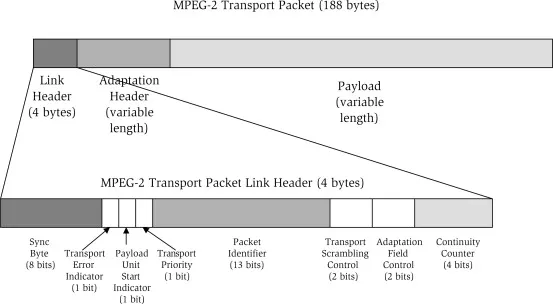 HLS TS
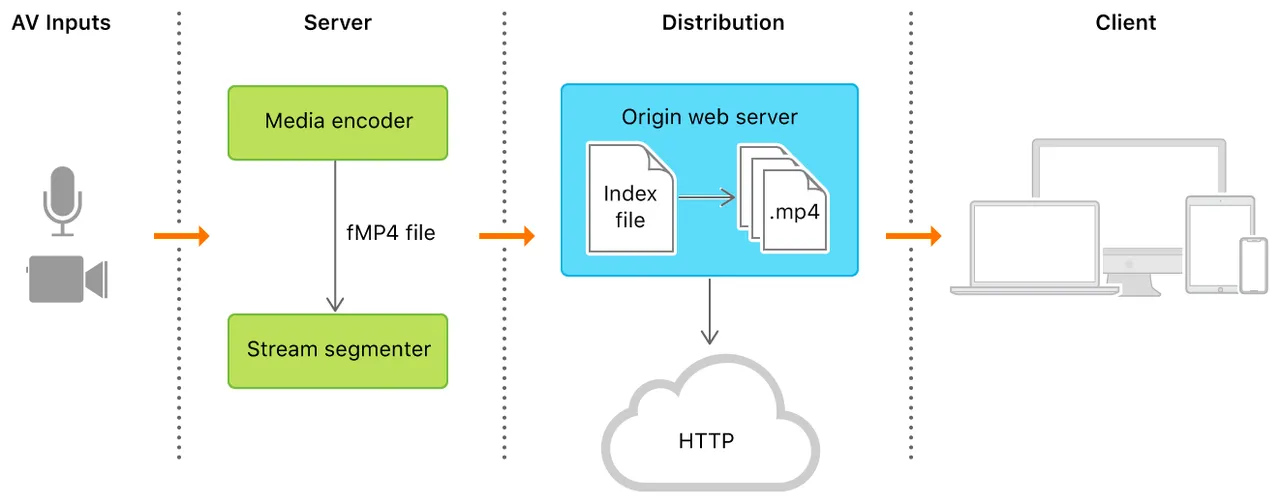 HLS fMP4
fMP4 is supported starting from EXT-X-VERSION 7.
fMP4 is a streaming format based on MPEG-4 Part 12. It is very similar to mp4 but has some differences that make fMP4 better suited for streaming playback.
fMP4 supports h.265, which can significantly save bandwidth. It has gradually become the mainstream video format, especially in the field of video surveillance.
-
On-Demand (VOD) All
indexfiles andtsfiles are available at the current point in time. The secondaryindexfile records the addresses of alltsfiles. This mode allows the client to access the entire content. The example above shows the structure of anm3u8file in on-demand mode. -
Live Streaming
M3U8andtsfiles are generated in real time. The index file is constantly changing. During playback, the secondaryindexfile needs to be continuously downloaded to obtain the latest generatedtsfiles for video playback. If a secondaryindexfile does not have the#EXT-X-ENDLISTtag at the end, it indicates a live video stream.
Encryption info: #EXT-X-KEY:METHOD=AES-128,URI="xx.key",IV=xxx
FairPlay Streaming
FairPlay Streaming is:
- A secure key delivery mechanism Content Key is protected on the network and on the client during playback
- Key delivery is transport agnostic Easy to integrate with existing key server infrastructure
- Requires protected HDMI for external output
Workflow
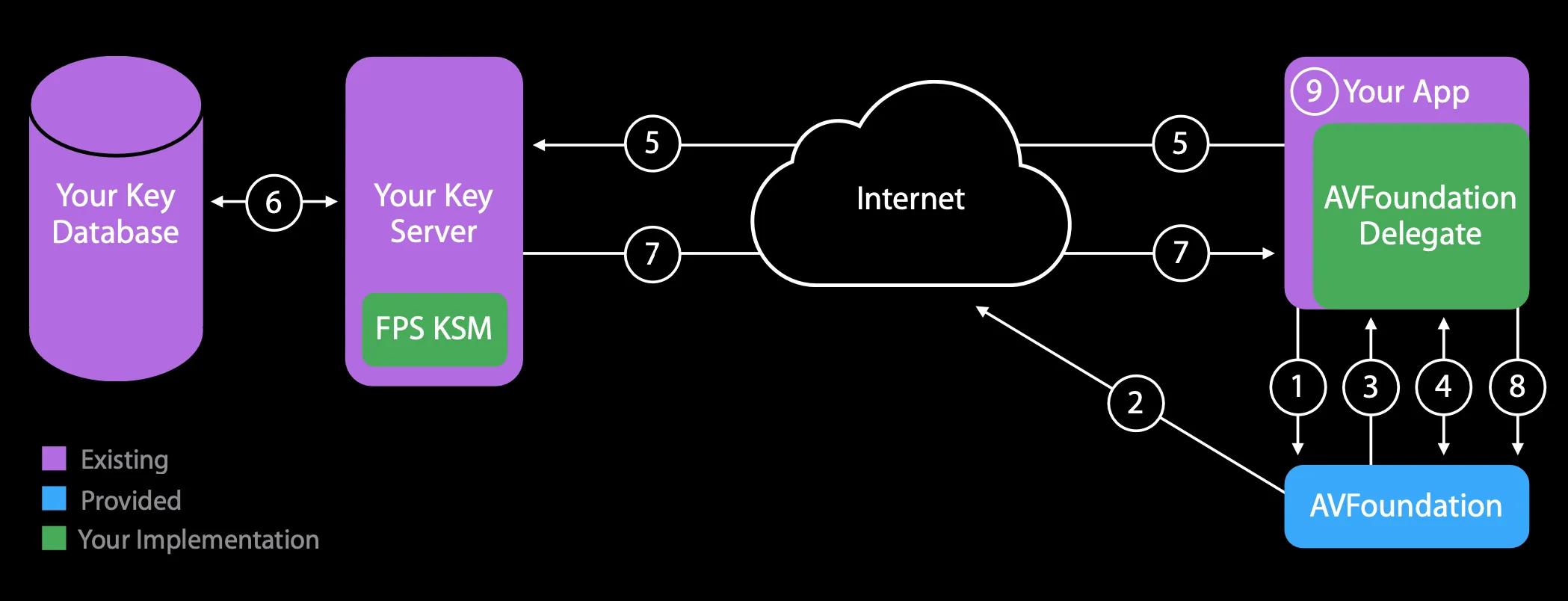 HLS Fair Play
Conceptually, HTTP Live Streaming consists of three parts: the server component, the distribution component, and the client software. In a typical configuration, a hardware encoder takes audio-video input, encodes it as HEVC video and AC-3 audio, and outputs a fragmented MPEG-4 file or an MPEG-2 transport stream. A software stream segmenter then breaks the stream into a series of short media files, which are placed on a web server. The segmenter also creates and maintains an index file containing a list of the media files. The URL of the index file is published on the web server. Client software reads the index, then requests the listed media files in order and displays them without any pauses or gaps between segments.
Download link: https://developer.apple.com/download/all/?q=HLS
After installation, there is a go example
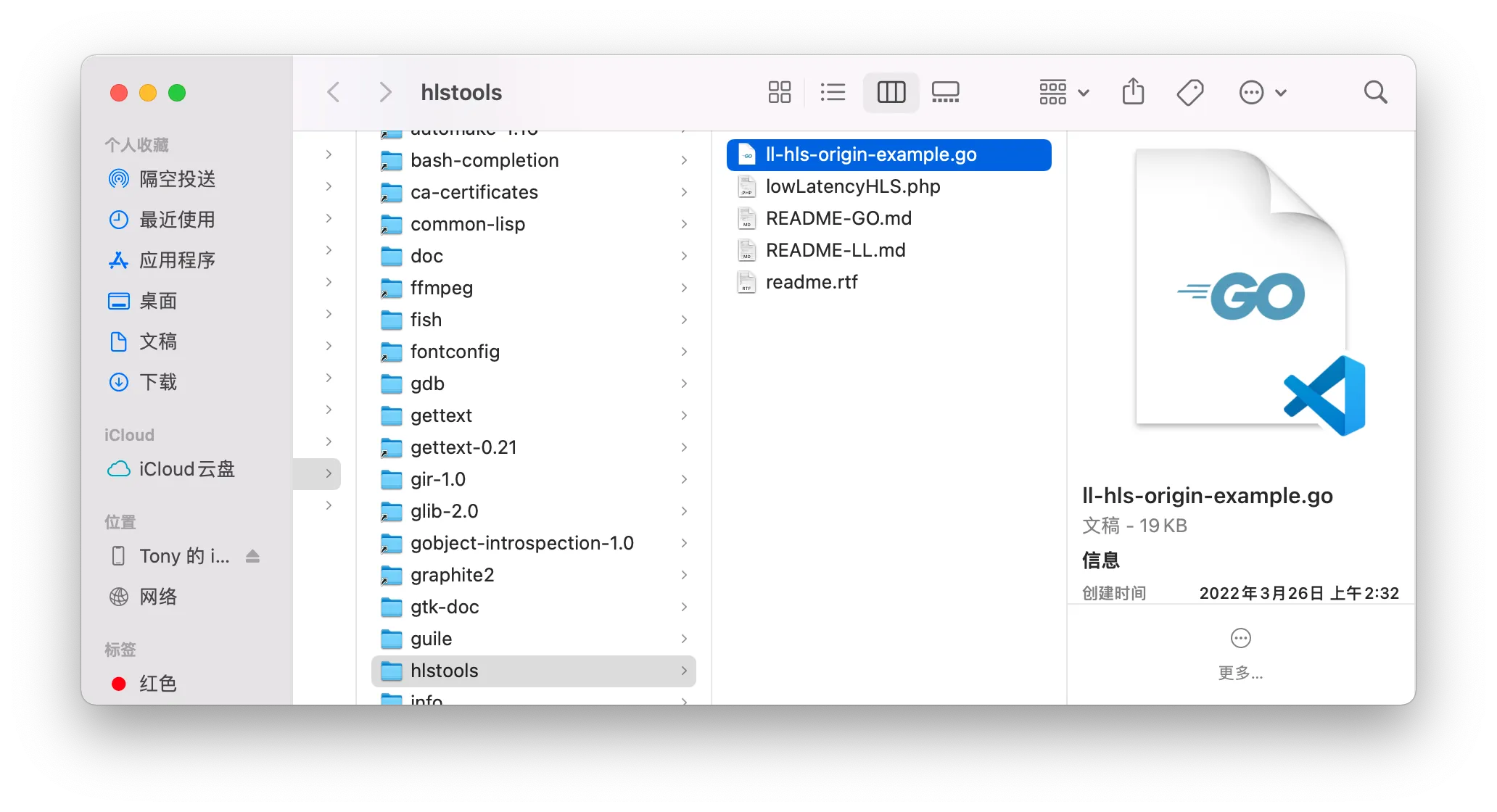 HLS Go Server
brew install go, install go, then start the service
# tony @ tonyMBP in ~/Desktop/hls_server [14:48:18]$ go run ll-hls-origin-example.goll-hls-origin-example.go:43:2: no required module provides package github.com/fsnotify/fsnotify: go.mod file not found in current directory or any parent directory; see 'go help modules'
# tony @ tonyMBP in ~/Desktop/hls_server [14:48:25] C:1$ go mod init hls_servergo: creating new go.mod: module hls_servergo: to add module requirements and sums:        go mod tidy
# tony @ tonyMBP in ~/Desktop/hls_server [14:49:23]$ go buildll-hls-origin-example.go:43:2: no required module provides package github.com/fsnotify/fsnotify; to add it:        go get github.com/fsnotify/fsnotify
# tony @ tonyMBP in ~/Desktop/hls_server [14:49:28] C:1$ go get github.com/fsnotify/fsnotifygo: downloading github.com/fsnotify/fsnotify v1.5.4go: downloading golang.org/x/sys v0.0.0-20220412211240-33da011f77adgo: added github.com/fsnotify/fsnotify v1.5.4go: added golang.org/x/sys v0.0.0-20220412211240-33da011f77ad
# tony @ tonyMBP in ~/Desktop/hls_server [14:49:48]$ go run ll-hls-origin-example.goListening on http://:8443/$ mediastreamsegmenter -w 499 -t 1 224.0.0.50:9121 -s 16 -D -T -f ~/Desktop/hls_server/hlsYou can use either the built-in system camera to capture audio and video, or specify a local video file.
$ ffmpeg -f avfoundation -list_devices true -i ""
[AVFoundation indev @ 0x7f924d904400] AVFoundation video devices:[AVFoundation indev @ 0x7f924d904400] [0] FaceTime HD Camera (Built-in)[AVFoundation indev @ 0x7f924d904400] [1] Capture screen 0[AVFoundation indev @ 0x7f924d904400] AVFoundation audio devices:[AVFoundation indev @ 0x7f924d904400] [0] LarkAudioDevice[AVFoundation indev @ 0x7f924d904400] [1] External Microphone[AVFoundation indev @ 0x7f924d904400] [2] MacBook Pro Microphone
$ ffmpeg -f avfoundation -framerate 30 -pixel_format uyvy422 -i "0:" -c:v h264 -fflags nobuffer -tune zerolatency -f mpegts udp://192.168.1.5:9121$ ffmpeg -re -i "/Users/tony/Downloads/sample.mp4" -c:v h264 -fflags nobuffer -tune zerolatency -f mpegts udp://192.168.1.5:9121-
How to fix inaccurate seeking?
mp4canseekto a specified timestamp, whiletscan onlyseekto a specific fileposition, not directly to a specified time point. Theseek-related code is in theevent_loopfunction inffplay.c. Forts, the specificseekoperation call chain is:avformat_seek_file() => av_seek_frame() => seek_frame_internal() => seek_frame_byte()Formp4, the specificseekoperation call chain is:avformat_seek_file() => av_seek_frame() => seek_frame_internal() => mov_read_seek()The
ts seeklogic: given a file position, directly point the file pointer to that position. Whenread_packet()is subsequently called to read atspacket (188 bytes), since aseekwas performed, the file pointer is likely not pointing to the header of ats packet(the header starts with a0x47 byte). In this case,mpegts_resync()needs to be called to resynchronize and find the header, before reading a completets packet. Themp4seeklogic: given a target timestamp for seeking, use the index information of each packet in themp4file to find the packet corresponding to the timestamp. Using theSample Tablein themp4file structure (shown below), thevideo audiodata packet for any given timestamp can be quickly located.Conclusion:
- For
mp4files, since an index table exists, the data corresponding to a given timestamp can be quickly found, soseekoperations complete rapidly. tsfiles have no mapping between timestamps and packet positions. Therefore, for the player, given aseektimestampts_seek, it first estimates a position based on the file bitrate, then retrieves the timestampts_actualof the data packet at that position. Ifts_actual<ts_seek, it needs to continue reading subsequent data packets; ifts_actual>ts_seek, it needs to read preceding data packets until the packet corresponding tots_seekis found. Hence,seekontsfiles can be more time-consuming. If thetsfile contains aCBRstream,ts_actualandts_seekgenerally differ little, makingseekrelatively fast. If thetsfile contains aVBRstream,ts_actualandts_seekmay differ significantly, makingseekrelatively slow.
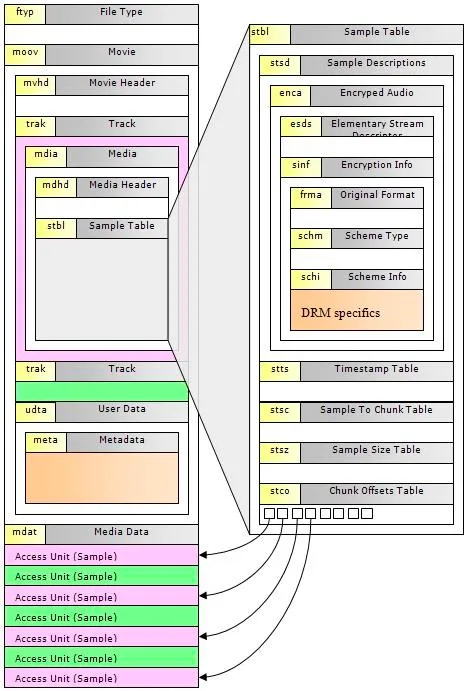 HLS Seek
 - For
-
Compatibility issues with
ts/fMP4files of different resolutions When playingm3u8video on Android, a garbled screen issue was encountered. The cause was identified as a change intsresolution. Thehevc_mp4toannexbfilter must be added, as the original protocol only supportsh264_mp4toannexb.H.264/5bitstreams come in two formats:Annex-BandAVCC.AVCCuses length information to separateNALUs and is used in container formats likemp4andflv.Annex-Busesstart code (0x000001 or 0x00000001)to separateNALUs and is used inmpegtsstreaming media files. After addinghevc_mp4toannexb, each frame can resolve the video width and height, preventing screen tearing during resolution switching.
References
- https://developer.apple.com/documentation/http_live_streaming/understanding_the_http_live_streaming_architecture
- https://en.wikipedia.org/wiki/MPEG_transport_stream
- http://anddymao.com/2021/08/03/2021-08-03-%E4%B8%80%E7%A7%8D%E4%B8%87%E8%83%BDhls%E5%8D%8F%E8%AE%AE%E8%A7%A3%E6%9E%90%E6%96%B9%E6%B3%95/