The Essence of Apps and Mach-O Files
An app becomes a process when loaded. macOS executables use the Mach-O format with a Header, Load Commands, and Raw Segment Data (__TEXT, __DATA, __LINKEDIT). Fat Binaries bundle multiple architectures.
An app is essentially an executable program — a collection of computer code and data. From the operating system’s perspective, an app is a process. A process is an instance of a program that is currently running on the computer. In an operating system, a process is the basic unit for resource allocation and scheduling. Each process has its own memory space, register set, file handles, network connections, and other resources, allowing them to run and be managed independently.
The process is the most fundamental unit of resource allocation and scheduling in an operating system. The operating system manages processes through the Process Control Block (PCB). The PCB contains information such as the process state, process ID, process priority, memory usage, and file handles. When the operating system needs to switch to another process, it saves the current process’s context and loads the context of the next process, thereby achieving process switching.
In macOS, the PCB is called proc. The proc structure is a very important data structure in the macOS kernel, used to describe the state and information of a process within the kernel.
struct proc {    LIST_ENTRY(proc) p_list;                /* List of all processes. */
    void *          XNU_PTRAUTH_SIGNED_PTR("proc.task") task;       /* corresponding task (static)*/    struct  proc *  XNU_PTRAUTH_SIGNED_PTR("proc.p_pptr") p_pptr;   /* Pointer to parent process.(LL) */    pid_t           p_ppid;                 /* process's parent pid number */    pid_t           p_original_ppid;        /* process's original parent pid number, doesn't change if reparented */    pid_t           p_pgrpid;               /* process group id of the process (LL)*/    uid_t           p_uid;    gid_t           p_gid;    uid_t           p_ruid;    gid_t           p_rgid;    uid_t           p_svuid;    gid_t           p_svgid;    uint64_t        p_uniqueid;             /* process unique ID - incremented on fork/spawn/vfork, remains same across exec. */    uint64_t        p_puniqueid;            /* parent's unique ID - set on fork/spawn/vfork, doesn't change if reparented. */
    lck_mtx_t       p_mlock;                /* mutex lock for proc */    pid_t           p_pid;                  /* Process identifier. (static)*/    char            p_stat;                 /* S* process status. (PL)*/    char            p_shutdownstate;    char            p_kdebug;               /* P_KDEBUG eq (CC)*/    char            p_btrace;               /* P_BTRACE eq (CC)*/    /* Other fields omitted for brevity */};
proc contains a large number of fields and pointers used to describe various attributes and resource usage of a process, such as process state (p_stat), process ID (p_pid), process name (p_comm), process priority (p_priority), process memory usage (p_vmspace), file descriptor table (p_fd), thread list (p_threadlist), and more.
Before an app is loaded into memory and becomes a process, the executable file on macOS is a Mach-O file. The Mach-O file contains multiple parts including executable code, data, symbol tables, and dynamic linking information. It is the fundamental format for applications and library files on macOS.
The format of a Mach-O file can be divided into three parts: the Header, Load Commands, and Raw Segment Data.
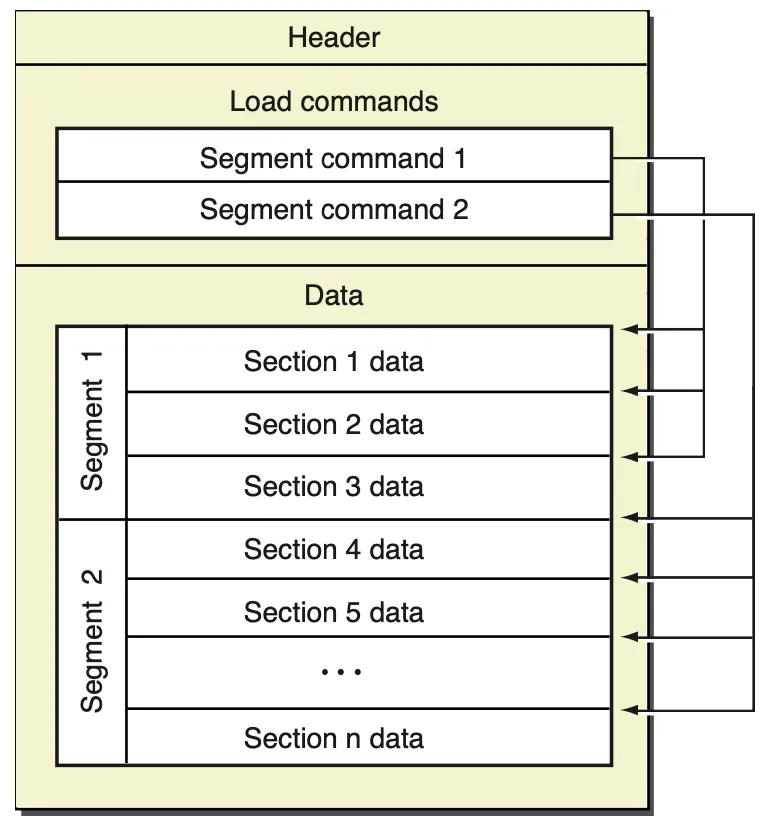 Mach-O file
A Mach-O file that contains multiple CPU architectures is called a Fat Binary. You can check the CPU architecture of a Mach-O file using the file command.
$ file /System/Applications/Calculator.app/Contents/MacOS/Calculator/System/Applications/Calculator.app/Contents/MacOS/Calculator: Mach-O universal binary with 2 architectures: [x86_64:Mach-O 64-bit executable x86_64] [arm64e:Mach-O 64-bit executable arm64e]/System/Applications/Calculator.app/Contents/MacOS/Calculator (for architecture x86_64): Mach-O 64-bit executable x86_64/System/Applications/Calculator.app/Contents/MacOS/Calculator (for architecture arm64e): Mach-O 64-bit executable arm64eThe data structure definition of fat_header corresponding to Fat Binary in the operating system is fat_header.
struct fat_header { uint32_t magic; /* FAT_MAGIC */ uint32_t nfat_arch; /* number of structs that follow */};// Fat Binary contains Mach-O files composed of multiple fat_arch structuresstruct fat_arch { cpu_type_t cputype; /* cpu specifier (int) */ cpu_subtype_t cpusubtype; /* machine specifier (int) */ uint32_t offset; /* file offset to this object file */ uint32_t size; /* size of this object file */ uint32_t align; /* alignment as a power of 2 */};As you can see, the Calculator app Mach-O file on macOS is a Fat Binary containing both x86_64 and arm64e CPU architectures.
Since iOS 11.0, the iOS system no longer supports architectures like armv7 and armv7s — only the arm64 architecture is supported. Therefore, for projects that only support iOS 11.0 and later, the Fat Binary build product contains only the arm64 Mach-O file. This is also why Xcode 14.0 removed bitcode — there is no longer a need to compile into bitcode intermediate artifacts, and bitcode translation consumes AppStore server resources.
The Mach-O header contains information such as the file type, CPU type, and number of load commands. Mach-O supports multiple file types, including executables, dynamic libraries, frameworks, and more. The CPU type specifies the CPU architecture for which the executable is intended, such as x86, x86_64, armv7, arm64, etc. The number of load commands specifies how many load commands are contained in the file.
The otool command is a tool available on macOS, iOS, and other operating systems for inspecting binary files such as executables, dynamic libraries, and frameworks. It can be used to view header information, section tables, symbol tables, dynamic linking information, and more.
$ otool -h /System/Applications/Calculator.app/Contents/MacOS/Calculator/System/Applications/Calculator.app/Contents/MacOS/Calculator:Mach header magic cputype cpusubtype caps filetype ncmds sizeofcmds flags 0xfeedfacf 16777228 2 0x80 2 29 4208 0x00200085In addition to the otool command, you can also use the MachOView tool to inspect Mach-O files through a graphical interface.
brew install machoview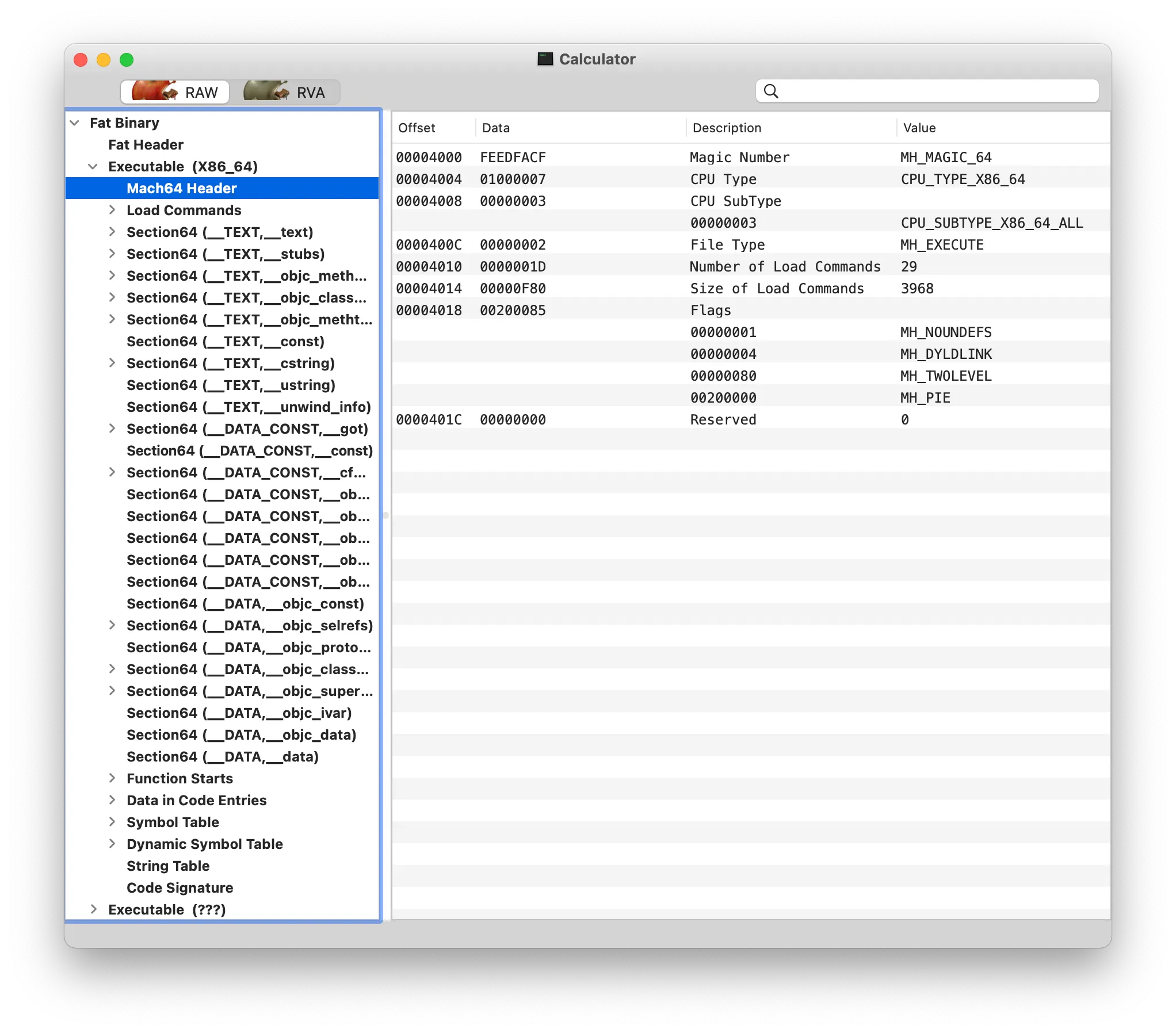 MachOView
In a Fat Binary, each architecture has a header, which is called mach_header. The 64-bit architecture’s mach_header has an additional reserved field.
/* * The 32-bit mach header appears at the very beginning of the object file for * 32-bit architectures. */struct mach_header { uint32_t magic; /* mach magic number identifier */ cpu_type_t cputype; /* cpu specifier */ cpu_subtype_t cpusubtype; /* machine specifier */ uint32_t filetype; /* type of file */ uint32_t ncmds; /* number of load commands */ uint32_t sizeofcmds; /* the size of all the load commands */ uint32_t flags; /* flags */};/* Constant for the magic field of the mach_header (32-bit architectures) */#define MH_MAGIC 0xfeedface /* the mach magic number */#define MH_CIGAM 0xcefaedfe /* NXSwapInt(MH_MAGIC) *//* * The 64-bit mach header appears at the very beginning of object files for * 64-bit architectures. */struct mach_header_64 { uint32_t magic; /* mach magic number identifier */ cpu_type_t cputype; /* cpu specifier */ cpu_subtype_t cpusubtype; /* machine specifier */ uint32_t filetype; /* type of file */ uint32_t ncmds; /* number of load commands */ uint32_t sizeofcmds; /* the size of all the load commands */ uint32_t flags; /* flags */ uint32_t reserved; /* reserved */};/* Constant for the magic field of the mach_header_64 (64-bit architectures) */#define MH_MAGIC_64 0xfeedfacf /* the 64-bit mach magic number */#define MH_CIGAM_64 0xcffaedfe /* NXSwapInt(MH_MAGIC_64) */The Load Commands in a Mach-O file describe the attributes and locations of various segments of the executable. The operating system uses this information to load the executable into memory. Each Load Command describes a specific segment or region. Common Load Commands include:
LC_SEGMENTandLC_SEGMENT_64: Describe segment information for executable code and data.LC_SYMTABandLC_DYSYMTAB: Describe the symbol table and dynamic symbol table information.LC_LOAD_DYLIBandLC_LOAD_WEAK_DYLIB: Describe dynamic library information.LC_MAIN: Describe the program entry point.
struct load_command { uint32_t cmd; /* type of load command */ uint32_t cmdsize; /* total size of command in bytes */};The data area of a Mach-O file contains multiple segments, each containing different types of data. Common segments include __TEXT, __DATA, __LINKEDIT, and others. The __TEXT segment contains code and read-only data, the __DATA segment contains global and static variables, and the __LINKEDIT segment contains the symbol table and relocation information.
struct segment_command_64 { /* for 64-bit architectures */ uint32_t cmd; /* LC_SEGMENT_64 */ uint32_t cmdsize; /* includes sizeof section_64 structs */ char segname[16]; /* segment name */ uint64_t vmaddr; /* memory address of this segment */ uint64_t vmsize; /* memory size of this segment */ uint64_t fileoff; /* file offset of this segment */ uint64_t filesize; /* amount to map from the file */ int32_t maxprot; /* maximum VM protection */ int32_t initprot; /* initial VM protection */ uint32_t nsects; /* number of sections in segment */ uint32_t flags; /* flags */};In a Mach-O file, each Segment contains one or more sections, each containing a related set of data or code. For example, in an executable file, common segments include __TEXT, __DATA, __LINKEDIT, etc. Each segment contains multiple sections — for instance, __TEXT contains sections like __text, __cstring, __stub, and more.
A Section is a subunit within a Mach-O file. It is a sub-segment inside a Segment, containing a related set of data or code. Each Section has a name and a type, such as __text, __data, __cstring, etc. In Mach-O files, the names and types of sections are typically determined by the compiler and linker, and different compilers and linkers may use different names and types.
struct section_64 { /* for 64-bit architectures */ char sectname[16]; /* name of this section */ char segname[16]; /* segment this section goes in */ uint64_t addr; /* memory address of this section */ uint64_t size; /* size in bytes of this section */ uint32_t offset; /* file offset of this section */ uint32_t align; /* section alignment (power of 2) */ uint32_t reloff; /* file offset of relocation entries */ uint32_t nreloc; /* number of relocation entries */ uint32_t flags; /* flags (section type and attributes)*/ uint32_t reserved1; /* reserved (for offset or index) */ uint32_t reserved2; /* reserved (for count or sizeof) */ uint32_t reserved3; /* reserved */};References