Audio, Video, and Their Digital Representation
Explains how sound and images are digitized into audio and video through sampling, quantization, and encoding, covering audio codecs, YUV color spaces, H.264 byte streams, and FFmpeg usage.
Sound and images are two fundamental ways humans perceive the world, each rooted in different physical phenomena.
Sound is a mechanical wave generated by vibrating objects. When an object vibrates, the surrounding air molecules vibrate along with it, forming longitudinal waves of alternating compression and rarefaction. These mechanical waves propagate through a medium (air, water, etc.), are received by the eardrum in the ear, and are then transformed into what we perceive as sound through the auditory nerve.
The characteristics of sound are determined by two core parameters:
- Frequency: Determines pitch (measured in Hz). The human audible range is approximately 20Hz ~ 20kHz
- Amplitude: Determines volume (measured in dB)
Images are visual information conveyed through light. Light is an electromagnetic wave. When it strikes the surface of an object and reflects into our eyes or a camera, we perceive an image.
The characteristics of images are determined by two core parameters:
- Color: Determined by the wavelength (frequency) of light. The visible light spectrum ranges from approximately 380nm ~ 780nm
- Brightness: Determined by the intensity of light
Sound and light in nature are both continuous analog signals. Through digitization, these continuous signals can be converted into discrete digital forms for easier storage, transmission, and processing.
Digitized sound is called Audio, and the digitized sequence of images is called Video, collectively referred to as Audio/Video (A/V).
At the capture end, audio is converted from sound waves into electrical signals via a microphone, while video is converted from light signals into electrical signals via a CMOS image sensor. These signals are then converted into digital data by an ADC (Analog-to-Digital Converter) for storage.
-
Sampling. The continuous analog audio signal is sampled at fixed time intervals to produce a series of discrete sample values. The sampling frequency determines how many samples are taken per second, typically measured in Hertz (Hz). A common audio sampling rate is 44.1kHz.
-
Quantization, which uses numbers to represent the audio amplitude. Quantization depth, also known as sampling precision, is the number of bits used to convert an analog signal into a binary digital signal. The higher the quantization depth, the higher the precision of the digital signal. For example, with a quantization depth of 16 bits, the sampled signal amplitude has
2^16 = 65536discrete levels. Common audio quantization depths include 8 bit, 16 bit, 20 bit, 24 bit, and 32 bit. -
Encoding, which compresses the quantized digital signal to reduce data size. Encoding can be lossless (e.g., FLAC) or lossy (e.g., AAC, MP3). Common encoding formats include
AAC,MP3,G.711, andOpus. Among these,Opusis free and open-source, supporting all scenarios from low-bitrate speech to high-bitrate music. It offers good encoding quality with low noise floor and is increasingly adopted by streaming media.

In the diagram above, the horizontal axis represents time. The number of vertical lines within 1 second corresponds to the sampling rate, the height of each line corresponds to the signal amplitude, and the reciprocal of the minimum unit of signal amplitude is the quantization depth.
| Sample Rate | Bit Depth | Number of Channels |
|---|---|---|
| The number of sound amplitude samples extracted per second | The number of binary bits used to represent the data range for each sample point | The number of sound channels |
| Higher sample rate yields higher sound quality and larger data size | Higher bit depth yields better sound quality and larger data size | Stereo offers richer expression than mono, but doubles the data size |
| Common sample rates: _ 8,000 Hz - Telephone _ 11,025 Hz - AM radio _ 22,050 Hz - Radio broadcast _ 32,000 Hz - miniDV * 44,100 Hz - Audio CD | _ 8 bit, dividing amplitude into 2^8 levels _ 16 bit, 65536 levels, CD standard * 32 bit, 4294967296 levels | _ Mono does not mean only one speaker produces sound; typically both speakers output the same channel _ Stereo uses both speakers (usually with left/right channel分工), creating a greater sense of spatial effect. * Beyond mono and stereo, there are multi-channel formats such as 5.1, 7.1, etc. |
-
Sampling: A video signal consists of a continuous sequence of analog images. During sampling, images are captured at fixed intervals, converting the continuous images into discrete pixels. The number of samples per second corresponds to the video frame rate.
-
Quantization: For each pixel, the brightness and color of the image are quantized into digital values. This is typically divided into luminance quantization and chrominance quantization.
-
Color Space Conversion (Optional): In some cases, the video signal may need to be converted between different color spaces, for example from
RGB (Red, Green, Blue)toYUV (Luma, Chroma). This is typically done to represent and transmit image information more efficiently. TheRGBcolor space contains many color values that the human eye cannot distinguish, and the human eye is far more sensitive to brightness (luminance) than to color (chrominance).Y (Luma)represents brightness, whileUandV (Chroma)represent color. By separating color information intoUandVcomponents, color data can be compressed more effectively, making it more suitable for storage and transmission. -
Encoding: Finally, the encoding stage uses a video codec to compress the data. The core idea of video encoding is to eliminate spatial redundancy (similarity between adjacent pixels within a frame) and temporal redundancy (similarity between adjacent frames). Common encoding formats include
AVC (H.264),HEVC (H.265),VP9, andAV1. H.264 remains the most widely compatible format, while H.265 and AV1 can save approximately 30%~50% in bitrate at the same visual quality.
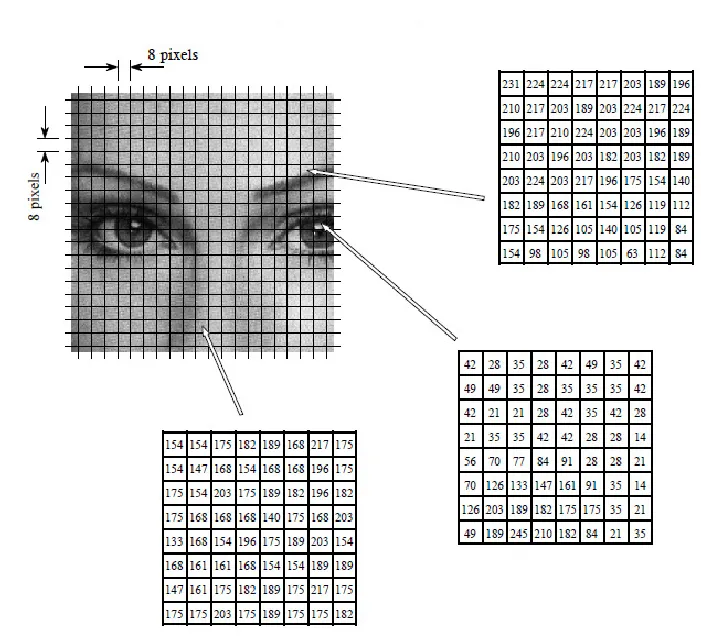
The diagram above shows an illustration of H.264 encoding, where each image is divided into 8×8 pixel blocks for encoding.
A color space is an organization method for colors. A color model is an abstract mathematical model that describes colors using a set of numbers (e.g., RGB uses triples, CMYK uses quadruples). Since a “color space” pairs a fixed color model with a specific mapping function, the term is also used informally to refer to color models. Common color models include RGB, YUV (YCbCr), HSV, HSL, and CMYK. Below, we focus on the YUV color model.
YUV is a model for representing color. However, what is commonly referred to as YUV in practice is actually YCbCr, where Y is the luminance component, Cb is the blue-difference chroma component, and Cr is the red-difference chroma component. It is a variant of the standard YUV. In this article, we will use YUV to refer to YCbCr.
YUV formats are divided into three types based on data size: YUV 420, YUV 422, and YUV 444. Since the human eye is far more sensitive to Y than to U and V, multiple Y components can sometimes share a single set of UV values. This dramatically saves space without significant quality loss.
YUV 420: 4Ycomponents share one set ofUVcomponentsYUV 422: 2Ycomponents share one set ofUVcomponentsYUV 444: No sharing; eachYcomponent has its own set ofUVcomponents
Within these three types, we can further subdivide formats based on the storage order of YUV components. Based on the arrangement of YUV, we can again classify YUV into three major categories: Planar, Semi-Planar, and Packed.
- Planar: The three YUV components are stored separately
- Semi-Planar: The Y component is stored separately; UV components are interleaved
- Packed: All three YUV components are fully interleaved
H.264 encoding has two Byte Stream Formats: AnnexB and AVCC.
AnnexB format:([start code] NALU) | ( [start code] NALU) |AVCC format:([extradata]) | ([length] NALU) | ([length] NALU) |In annexb, [start code] may be 0x000001 or 0x00000001. In avcc, the bytes of [length] depends on NALULengthSizeMinusOne in avcc extradata, the value of [length] depends on the size of following NALU and in both annexb and avcc format, the NALUs are no different.
Annex B is commonly used in network streaming formats such as rtmp and rtp, while AVCC is commonly used in file storage formats such as mp4.
H.265 encoding differs from H.264. Its Byte Stream Format includes H.265 Annex B and H.265 Parameter Sets.
We can use the ffprobe tool provided by FFmpeg to view video file information.
From the highlighted section in the image below, we can see that the video file is an mp4 file, with a duration of 7.62 seconds, a bitrate of 13805 kb/s, and contains 2 Streams.
The Video stream uses H.264 encoding, the color space is yuv420, the resolution is 1080P (1920×1080), and the frame rate is 29.97.
The Audio stream uses aac encoding, with a sample rate of 44.1kHz, and is stereo.
1080p is a video resolution standard that refers to a vertical resolution of 1080 pixels. Specifically, 1080p video has a resolution of 1920x1080, where 1920 is the number of horizontal pixels and 1080 is the number of vertical pixels. The letter "p" stands for "progressive scan". This means that each frame of the video is created by scanning every row of pixels in the entire image, rather than by alternating between scanning odd and even rows (known as "interlaced scan"). Compared to interlaced scanning, progressive scanning provides a clearer image because it better preserves detail and clarity in moving images.
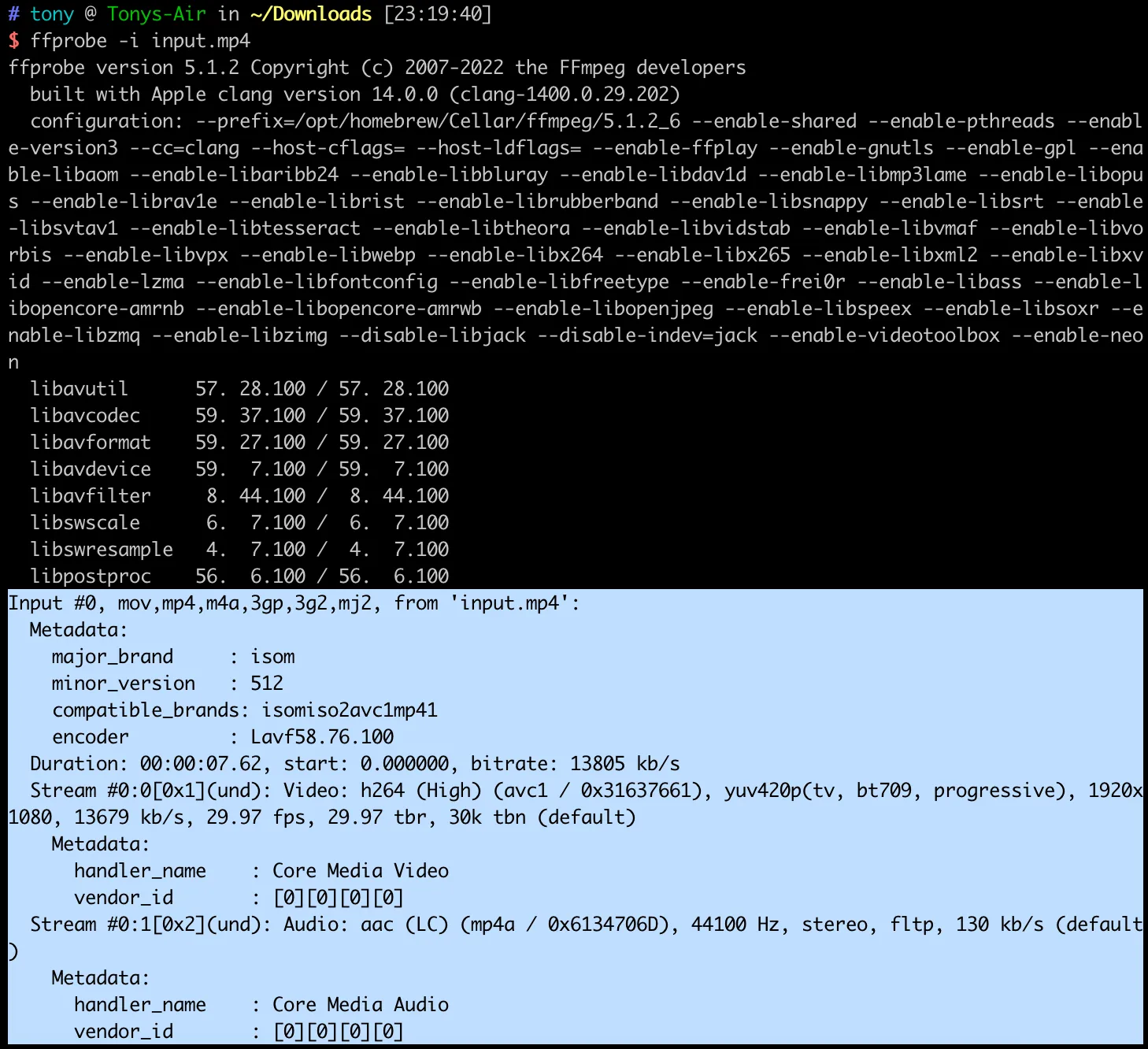
That information is the metadata of the mp4 file, stored in the moov box of the mp4 container. Common fields include:
major_brand: The primary brand identifier of the file (e.g.,isom,mp42), indicating which mp4 specification version the file followsminor_version: The minor version numbercompatible_brands: A list of compatible brands, indicating which decoders/players can correctly parse the fileencoder: The software that encoded the file (e.g.,Lavf58.29.100indicates FFmpeg’s libavformat library)creation_time,duration, and other time-related information
This metadata helps players quickly understand the file structure before decoding, allowing them to select the correct demultiplexing (demux) and decoding strategies.
The previous section already introduced the classification of YUV formats. Here we further explain the meaning of YUV420:
The numbers in “420” represent the sampling ratio of the Y, Cb, and Cr components across a block of 4 pixels. Specifically:
- Each row of 4 pixels has independent Y (luminance) values
- Every 2×2 pixel block shares 1 set of Cb and Cr values
- That is, chroma is downsampled by a factor of 2 in both the horizontal and vertical directions
Data size comparison:
- YUV444: 3 bytes per pixel (1 byte each for Y, U, V), totaling
width × height × 3 - YUV420: 1.5 bytes per pixel on average (1 byte for Y, 0.25 bytes each for U and V), totaling
width × height × 1.5
YUV420 saves 50% storage space compared to YUV444, while the quality loss is nearly imperceptible since the human eye is less sensitive to color changes. This is why the vast majority of video codecs (H.264, H.265, VP9, etc.) use YUV420 by default.
The frame rate in the example is 29.97 fps rather than 30 fps — this is a legacy of the NTSC color television standard.
In the 1950s, the US black-and-white television standard was 30 fps (based on the 60Hz AC power frequency). When color signals were introduced, engineers needed to transmit both luminance and chrominance information within the existing bandwidth while remaining compatible with the existing black-and-white television signals. To avoid beat interference between the chrominance subcarrier and the audio carrier, the frame rate was slightly reduced by 0.1% from 30 fps:
This 1000/1001 ratio has been preserved to this day. Similarly, 24fps film becomes 23.976 fps under the NTSC standard, and 60fps becomes 59.94 fps.
In digital video, frame rates are typically expressed as fractions for precision: e.g., 30000/1001 rather than the floating-point 29.97. The time_base and r_frame_rate fields in FFmpeg use this fractional form to avoid floating-point precision issues.
References