Deploying ComfyUI on macOS
A guide to installing and running ComfyUI on Apple Silicon Mac, including Python setup, PyTorch, dependencies, and troubleshooting.
ComfyUI is a powerful and modular Stable Diffusion graphical user interface (GUI) and backend tool. It provides a graph/nodes/flowchart-based interface that lets you design and execute complex Stable Diffusion workflows without writing code. Here are its features and capabilities:
- Node/graph/flowchart interface: Experiment with and create complex Stable Diffusion workflows without writing any code.
- Comprehensive support:
ComfyUIsupports SD1.x, SD2.x, SDXL, Stable Video Diffusion, and Stable Cascade. - Asynchronous queue system: The optimized queue system only re-executes the parts of the workflow that have changed.
- Low VRAM support: With the
--lowvramoption, it can run even on GPUs with less than 3GB of VRAM (automatically enabled on low-VRAM GPUs). - Offline operation:
ComfyUIworks entirely offline and does not download anything. - Model support: Can load
ckpt,safetensors, anddiffusersmodels/checkpoints, as well as standaloneVAEandCLIPmodels. - Workflow save/load: You can save workflows as JSON files and load complete workflows (including seeds) from generated PNG files.
We can use ComfyUI to easily generate images.
Local environment:
- 16-inch MacBook Pro (Apple Silicon M1 Pro)
- 16GB unified memory
- 512GB SSD
- macOS Sonoma 14.4 (23E214)
macOS comes with Python 3 pre-installed. To avoid having to manually type python3 every time, let’s set up some aliases.
$ vim ~/.zshrc// Add the following three linesexport PATH="/Users/tony/Library/Python/3.9/bin:$PATH"alias python='python3'alias pip='pip3'$ source ~/.zshrc$ pip install --pre torch torchvision torchaudio --extra-index-url https://download.pytorch.org/whl/nightly/cpuRepository URL: https://github.com/comfyanonymous/ComfyUI.git
Place models in the models/checkpoints directory.
Switch to the ComfyUI directory and install dependencies:
$ pip install -r requirements.txtDuring installation, you may encounter the following error:
/Users/tony/Library/Python/3.9/lib/python/site-packages/urllib3/__init__.py:35:NotOpenSSLWarning: urllib3 v2 only supports OpenSSL 1.1.1+,currently the 'ssl' module is compiled with 'LibreSSL 2.8.3'.See: https://github.com/urllib3/urllib3/issues/3020This indicates an OpenSSL compilation issue — you’ll need to downgrade urllib3:
$ openssl versionLibreSSL 3.3.6$ pip install urllib3==1.26.6$ python main.py --force-fp16Total VRAM 16384 MB, total RAM 16384 MBForcing FP16.Set vram state to: SHAREDDevice: mpsVAE dtype: torch.float32Using sub quadratic optimization for cross attention, if you have memory or speed issues try using: --use-split-cross-attentionStarting server
To see the GUI go to: http://127.0.0.1:8188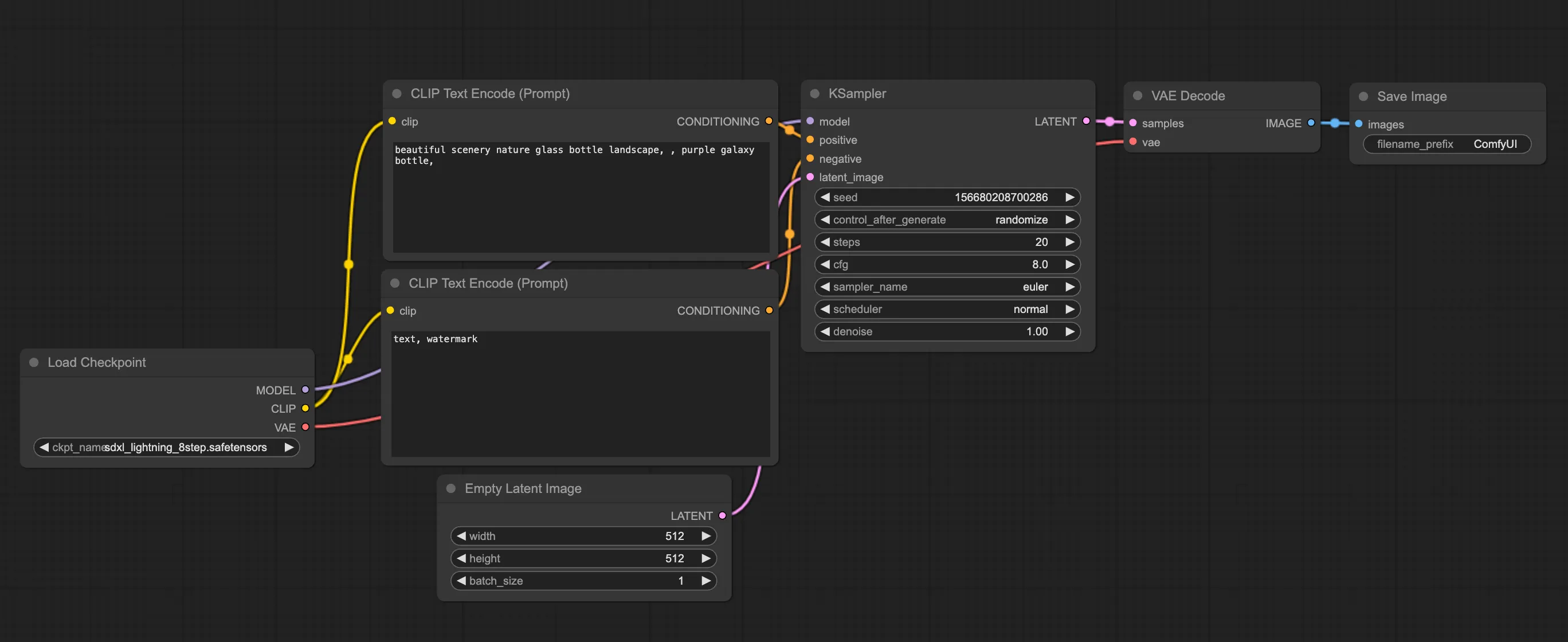
macOS Ventura can generate images normally. On macOS Sonoma 14.4 (23E214), GPU acceleration may fail, resulting in solid-color images. You can work around this by adding the -cpu parameter, though this will slow down image generation.